
The transformer turns on, the path lights flash for an instant, and then the walkway either lights normally or goes dark again. That last part matters more than how bright the flash looked. A system that settles into steady operation presents a different problem from one that cannot complete startup.
Before replacing anything, watch one normal start from where you can see the entire group. Note whether every fixture flashes together, whether only one does, and whether the lights stay on. Those observations separate a shared switching event from a fixture that responds differently to the same supply. A flash by itself cannot identify a bad transformer or LED driver.
A Single Startup Flash vs Continuous Flicker
The first boundary is timing. A single startup flash occurs as the system switches on and does not repeat while the lights run. Continuous flicker interrupts lights that are already operating. Repeated flashes near dusk may be several separate attempts to start, rather than one startup event that lasts a long time.
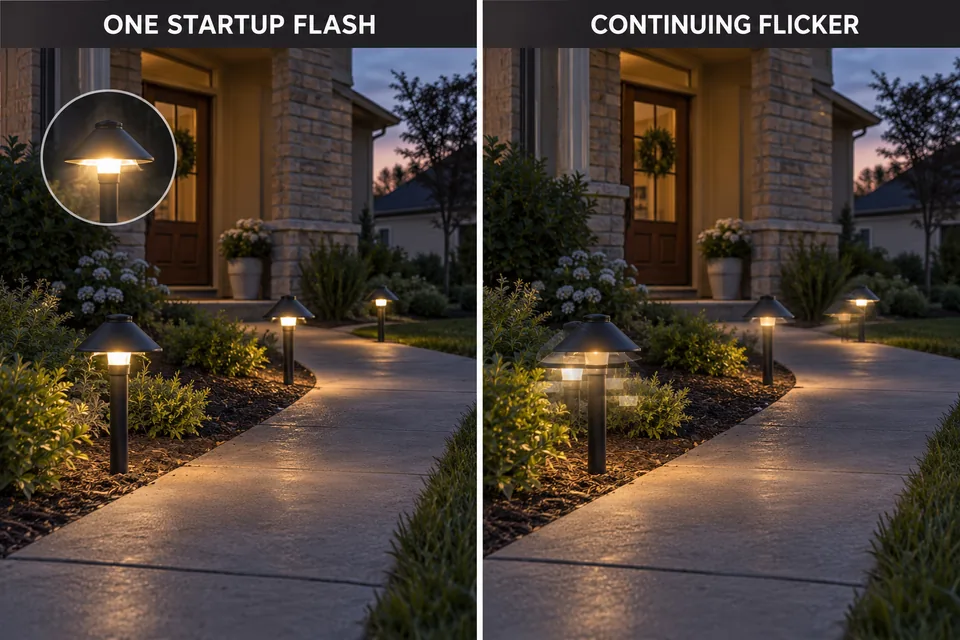
Watch long enough to see what follows the initial response. Do the lights reach normal brightness and remain there? Does one come on late? Do they flash and immediately go dark? These outcomes should not be grouped together merely because each begins with a momentary burst of light.
If a fixture continues fluttering after startup, use the separate diagnosis for LED lights that keep flickering. This page follows the narrower event at switch-on. If every light flashes and then stays dark, the lack of sustained operation becomes the main clue.
A brief flash also needs context. If the installation has behaved the same way since it was assembled and runs steadily afterward, there is little evidence from the flash alone that a part has recently failed. A flash that first appeared after changing a bulb, fixture, transformer, or control deserves a compatibility check. A flash that grows into delayed starts or shutdowns deserves a closer look at the affected part.
Inrush and Control Compatibility
An equipment change gives you a more useful starting point than the flash’s apparent intensity. When the system switches on, the control changes state, the transformer supplies its output, and the LED electronics in each fixture begin operating. That transition can produce a brief visible response. Inrush current or driver startup behavior may be involved, but neither can be diagnosed from a glance at the walkway.
Compare the installed equipment rather than relying on the phrase “low voltage.” The transformer label identifies its output; the bulb or fixture documentation identifies the input it accepts. Check whether those specifications match, including the stated output type. If a timer, photocell, or other control was added, check its instructions for the intended arrangement as well.
The timing of an installation change is useful evidence, though not proof. If the lights started flashing immediately after several LED bulbs replaced older lamps, examine the new bulbs’ compatibility as a group. If only one newly installed fixture flashes while the original fixtures start normally, begin with that fixture’s specifications. If the symptom began after a control change and affects every light, inspect the control sequence before treating each driver as suspect.
Do not use a higher transformer tap as an experiment to suppress a flash. A tap changes the supply conditions for fixtures along the run, including those that already operate correctly; it is not a general startup adjustment. Likewise, opening the transformer to investigate an instant of light is not the next homeowner check. Labels, installation records, and observed fixture behavior provide a safer and more discriminating first pass.
A visible flash does not automatically mean damaging inrush occurred. It also does not establish that the equipment is compatible. The practical question is whether the components are specified to work together and whether the system completes startup reliably.
Which Fixtures Flash Together
The strongest field clue is which lights share the event. Watch an ordinary scheduled start from a position where the whole run is visible. A short phone video can help you review a quick event, although camera exposure can exaggerate the brightness of LEDs. Use it to compare which fixtures responded together, not to measure the flash.
All fixtures flash together
When every fixture on the same controlled system flashes at the same instant, start with what they share: the control switching and the transformer supplying the run. Synchronized behavior does not prove the transformer has failed. It does make a fault inside one individual path light a weak explanation for the whole pattern.
Now separate two outcomes. If all the lights flash together and then remain steadily lit, confirm the equipment’s compatibility and watch whether the behavior changes over subsequent normal starts. Replacing every fixture or the transformer solely because of this observation would be a large decision built on little evidence.
If they flash together and then all remain dark, sustained power delivery is the problem to pursue. Follow the diagnosis for transformer output when the lights stay dark. A moment of light does not establish that the transformer and the connected system can keep operating under load.
One fixture flashes
If neighboring fixtures come on cleanly while one flashes, delays, or fails to stay lit, look for a difference at that fixture first. It may have a different bulb, a recently replaced integrated LED assembly, or input requirements unlike the rest of the run. Compare its label and installation instructions with the transformer’s specified output.
Pay attention to whether the same fixture behaves differently at every normal start. A one-off observation made while a timer was being programmed carries less weight than a repeatable local pattern. If the odd fixture also begins flickering during operation or occasionally stays dark, those additional symptoms strengthen the case for fixture-level diagnosis.
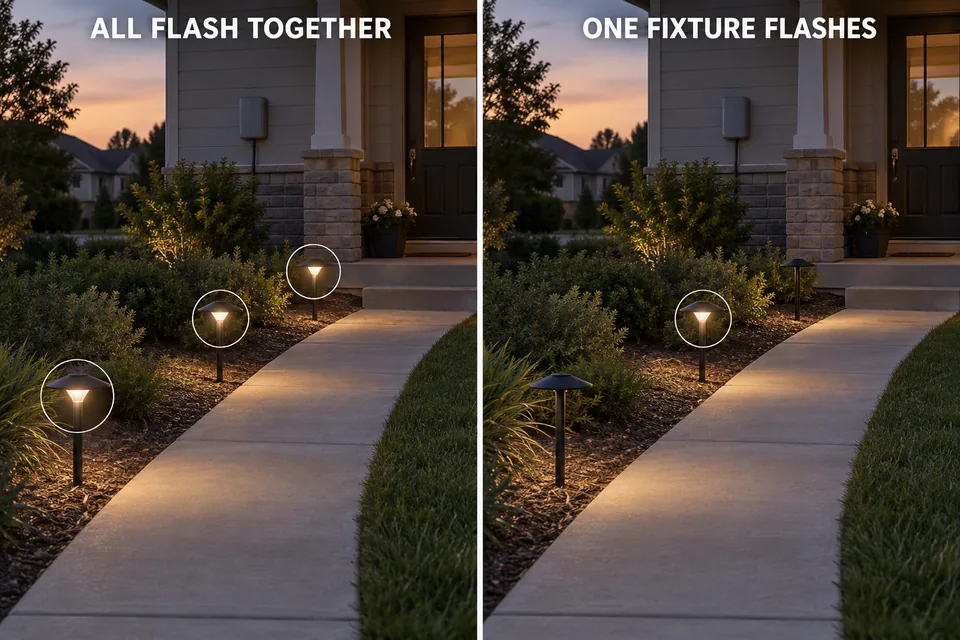
Sometimes one group flashes while another starts normally. First establish whether the groups use different controls, transformer outputs, or fixture types. A group pattern narrows the comparison, but it does not by itself prove a wiring defect or a bad transformer tap. Avoid turning this startup observation into a full cable-and-splice investigation unless another symptom points there.
Timer, Photocell, and Transformer Sequence
Before counting flashes, count startups. A timer may initiate operation at a scheduled time, a photocell may permit it after dark, or the transformer may contain its own control. Some installations combine more than one device. You need to know which part actually switches the system on before judging whether the lights flashed once or were started repeatedly.
Observe the usual scheduled event without changing settings first. Note whether the transformer and lights start once and remain on. If the manufacturer provides a manual or test mode, compare one start in that mode with the scheduled start. A flash under both conditions points toward behavior common to energizing the transformer and fixtures. A flash confined to one control mode makes that mode’s switching sequence more relevant.
This comparison has limits. Manual mode may still use some of the same internal control components, and different transformer designs do not all switch power in the same place. Treat the result as a way to prioritize the next check, not as proof that a timer, photocell, or transformer is defective. Use only the modes described in the equipment instructions; there is no need to bypass a control or alter wiring.
Dusk is especially easy to misread. If the lights turn on, go off, and turn on again, each new start may produce its own brief flash. That belongs with photocell cycling at dusk, rather than a diagnosis of one continuous LED flicker. Watch for an actual off period between flashes. It reveals more than trying to judge whether the bursts looked identical.
When the Startup Behavior Signals a Failing Driver
A local driver becomes a stronger suspect when the pattern changes and deteriorates at one fixture. A new startup flash confined to that light is a reason to check it, but delayed illumination, failure to remain on, or flickering after startup provides the evidence that makes replacement evaluation more useful. One brief flash followed by steady light does not establish driver failure.
Compatibility still comes first. If a replacement fixture expects an input the installed system does not provide, fitting another of the same type may reproduce the behavior. Check the fixture documentation before attributing the flash to age or wear. If the specifications match and only that fixture continues to develop symptoms, find out whether it has a replaceable lamp or driver, or whether its LED assembly is integrated and serviced as a complete unit.
There is a practical limit to repeated observation. You do not need to cycle the system over and over to provoke a flash. Compare a few ordinary starts, record whether the same fixture is affected, and look for symptoms during normal operation. If one light is steadily getting less reliable while its neighbors remain stable, move to the fuller diagnosis of outdoor LED driver failure.
Keep a synchronized, one-time flash at the shared startup sequence until another clue narrows it. Move toward a fixture-level replacement decision when one compatible fixture alone develops continuing problems. Damaged equipment, inaccessible components, and line-voltage work belong with a qualified electrician.
For the compatibility check, use the installed equipment’s specifications; VOLT Lighting’s transformer overview explains why transformer type can matter for LED operation. (www.voltlighting.com)