The landscape lights come on when you select manual ON, but the yard stays dark when their schedule should start.
The useful next check is whether the selected automatic mode received its required start condition: a clock event, darkness at the photocell, or permission from both controls.
Keep the same lights connected while you compare operation. First identify what should trigger them, then confirm that automatic control is active, and finally observe a fresh start event.
That sequence separates a settings problem from a control failure without replacing parts on the strength of one missed evening.
What Manual-On Proves
Use the normal connected lights to establish the baseline. A successful test with a different group or output does not prove that the scheduled group can operate. On a transformer with separately controlled outputs, compare manual and automatic behavior on the same one.
Also identify which manual control you used. Manual ON at the transformer and an override on a separate timer may act at different points. Neither necessarily bypasses every other control in the installation.
Successful operation shows that the tested arrangement can power those lights under the conditions observed. It does not establish that the clock is correct, the schedule is enabled, or the photocell responds properly.
If the lights also fail manually, stop adjusting the schedule and trace an actual power-loss problem instead. That failure no longer fits a schedule-only diagnosis.
A brief daytime test also cannot rule out trouble that appears after longer operation or under different conditions. For this comparison to remain useful, manual operation should stay normal during the test. A momentary flash is insufficient evidence.
Timer Program vs Photocell Dependency
Identify the selected mode’s start condition before changing its times. A setting labeled “timer” may count hours after dusk rather than start the lights at a particular clock time. Correcting the clock will not resolve a missing darkness trigger in that mode.
A four-hour dusk setting does not mean the lights start at four o’clock. Likewise, entering an OFF time does not necessarily create a clock-based ON event.
| Control type | Start condition | First relevant check |
|---|---|---|
| Clock-based ON/OFF | Programmed ON event | Clock, active program, selected mode |
| Dusk-to-dawn | Photocell detects darkness | Sensor exposure and specified delay |
| Dusk plus duration | Darkness starts a countdown | Darkness trigger and duration selection |
| Dusk-on / fixed-time-off | Darkness begins operation | Photocell condition and clock setting |
Your transformer may offer only some of these modes. Use its instructions to interpret the labels rather than assuming AUTO means “follow the clock program.”
For clock-based operation, compare the current displayed time with local time, including AM/PM. Check the active day if the controller supports weekly programs. After a power interruption, verify what the controller retained; different models preserve different settings.
Then confirm that the saved program belongs to the mode currently selected. A correctly stored ON time accomplishes nothing while the unit is operating in a different mode.
For photocell-dependent operation, examine the light reaching the sensor. A porch light can illuminate the sensor even when the walkway looks dark. That observation matters only if the selected mode uses the photocell.
If separate timer and photocell devices are installed, consult their documented arrangement. Both may need to permit operation. A darkness test performed outside the timer’s allowed period can therefore leave the lights off without proving that the photocell failed.
Override States That Block Auto Operation
Check the active operating state before editing a saved schedule. Program values can remain visible and correct while a persistent manual override prevents them from controlling the lights.
Permanent manual OFF can block scheduled startup. Permanent manual ON usually creates the opposite symptom: lights remain on through their scheduled OFF event. Both mean the schedule has lost control of normal switching.
Some temporary overrides expire at the next programmed event. Others remain until you explicitly restore automatic operation. Follow the model’s instructions, save the change, and check that the display has returned from programming to normal operation.
If this behavior began immediately after adding or replacing a control, problems that began after installing a timer or photocell deserve a separate installation-focused diagnosis.
For an established system, observe a new automatic transition. Returning to AUTO after the day’s ON time has already passed may not produce the same response on every controller. Arrange a future event so the test includes the moment when the timer should issue its command.
Testing One Control Source at a Time
Change one control condition while leaving the lighting load unchanged. Independent timer and photocell modes make the results easier to interpret. If your model lacks those modes, use its documented test procedure; do not disconnect wires or improvise a bypass.
- Record the current setup. Note the clock, selected mode, program, and manual control used. Keep the connected lights unchanged.
- Confirm manual operation. Turn on the same controlled group. If it behaves abnormally, the schedule-only comparison is no longer valid.
- Test a clock event where supported. Select the documented timer-only mode, clear overrides, and set an upcoming ON event followed by an OFF event. Use the controller’s supported time increments and observe both transitions.
- Test the photocell where supported. Select its documented operating mode or test function. If the instructions permit a covered-sensor test, cover only the sensing eye, wait the specified response delay, then uncover it and observe the response.
- Restore normal operation. Remove temporary test settings and the sensor covering. Restore the intended schedule, confirm the active automatic mode, and observe the next normal cycle.
If timer-only operation starts and stops the lights correctly, the clock-triggered function has passed that test. Continued failure in a photocell-dependent mode then shifts attention toward the darkness input or combined settings. Replacing the timer at that point would overlook the distinction the test just established.
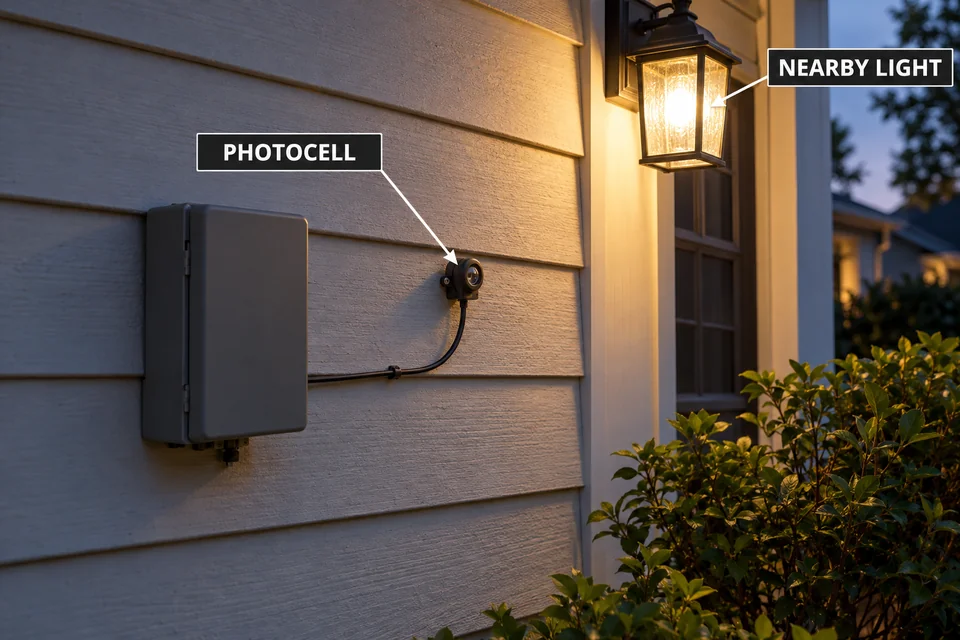
A photocell that responds when covered has demonstrated a response through the tested sensing and control path. If it then fails to start the lights at real dusk, inspect the illumination reaching it after the cover is removed. Leaving it permanently covered defeats the daylight response instead of correcting the conditions.
Conversely, no response during a darkness test does not automatically identify a bad sensor. The selected mode, another control’s permission, or the controller itself may still be involved. A dedicated test function may also behave differently from normal operation.
If neither automatic test works while manual operation remains normal, suspicion moves toward the automatic controls, but the failed component remains unconfirmed. Where independent tests are unavailable, use the manufacturer’s diagnostic procedure or support service rather than turning an inconclusive result into a replacement decision.
When the Control Module Has Failed
Consider control replacement only after a correctly configured automatic event repeatedly fails while the same lights continue working manually. A verified clock, active program, cleared override, and satisfied photocell condition make that evidence much stronger than a missed schedule alone.
First distinguish the components your model actually allows you to replace. A removable timer, an external photocell, and an integrated controller are different repair situations. Failure confined to the photocell-dependent function does not automatically justify replacing the complete transformer.
Where the manufacturer permits user replacement, an approved compatible accessory can provide a useful substitution test. Match the exact transformer requirements; a connector that physically fits does not establish electrical or functional compatibility. Disconnect power before removing or replacing an accessory.
If diagnosis or replacement requires access to internal line-voltage components, review when control replacement requires an electrician before proceeding. Some transformer assemblies have no user-serviceable internal parts.
Avoid naming a failed relay or circuit board from the symptom alone. Manual operation can coexist with a fault in a separate automatic switching path, and a working display does not prove that the scheduled command reaches the output.
Use the test result to set the repair boundary. Restored automatic operation after a mode correction requires no replacement; persistent failure under verified conditions warrants model-specific service or an approved accessory replacement. Finish by observing both automatic startup and shutdown with the normal lights connected. Manual ON alone cannot confirm the repair.
For manufacturer guidance on checking controls and removing a temporary photocell test cover afterward, see Kichler’s landscape lighting troubleshooting guidance.