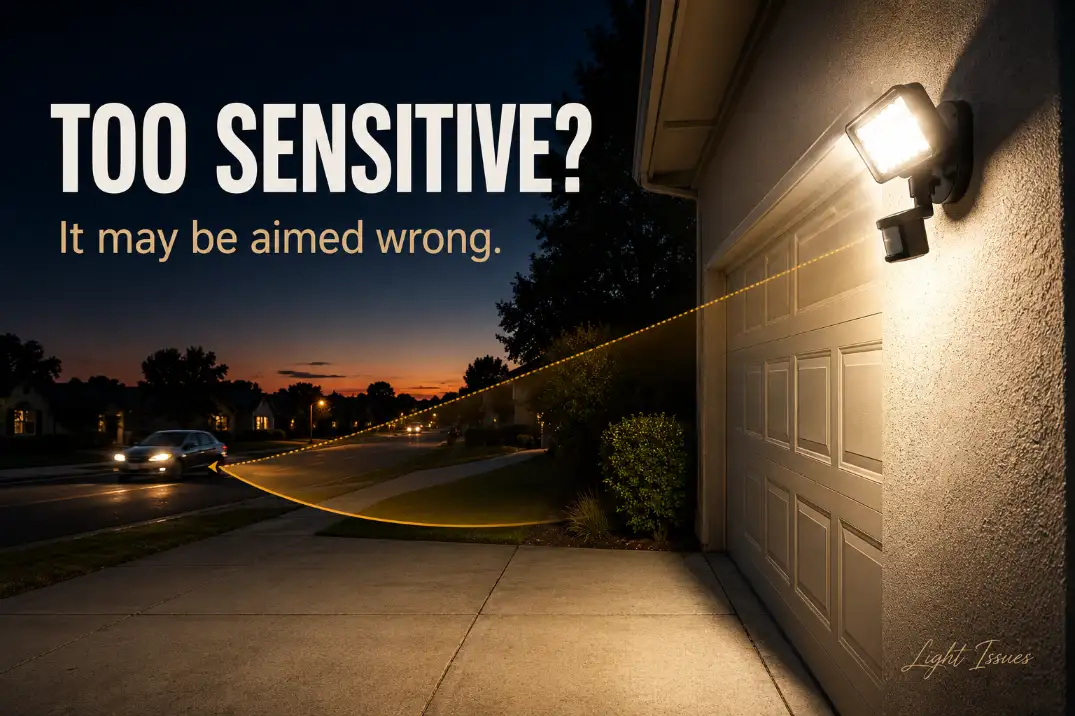
An outdoor motion sensor light that is too sensitive usually has one of three problems: the detection zone reaches too far, the sensor is aimed at the wrong heat source, or the fixture is in test/manual mode and only looks like a sensitivity problem.
Start with the sensor angle, then the range setting, then the time and lux controls. If the light activates every 2–5 minutes on a calm night or catches cars 40–70 feet away, that is not strong security coverage; it is an oversized detection zone.
This is different from a light that flickers, loses power, or stays on continuously. A too-sensitive motion light still responds to triggers.
It just responds to the wrong ones: traffic, shrubs, pets, dryer vents, warm pavement, or reflected heat. The fix is rarely replacing the bulb. The useful work happens at the sensor.
The Fastest Way to Make a Motion Light Less Sensitive
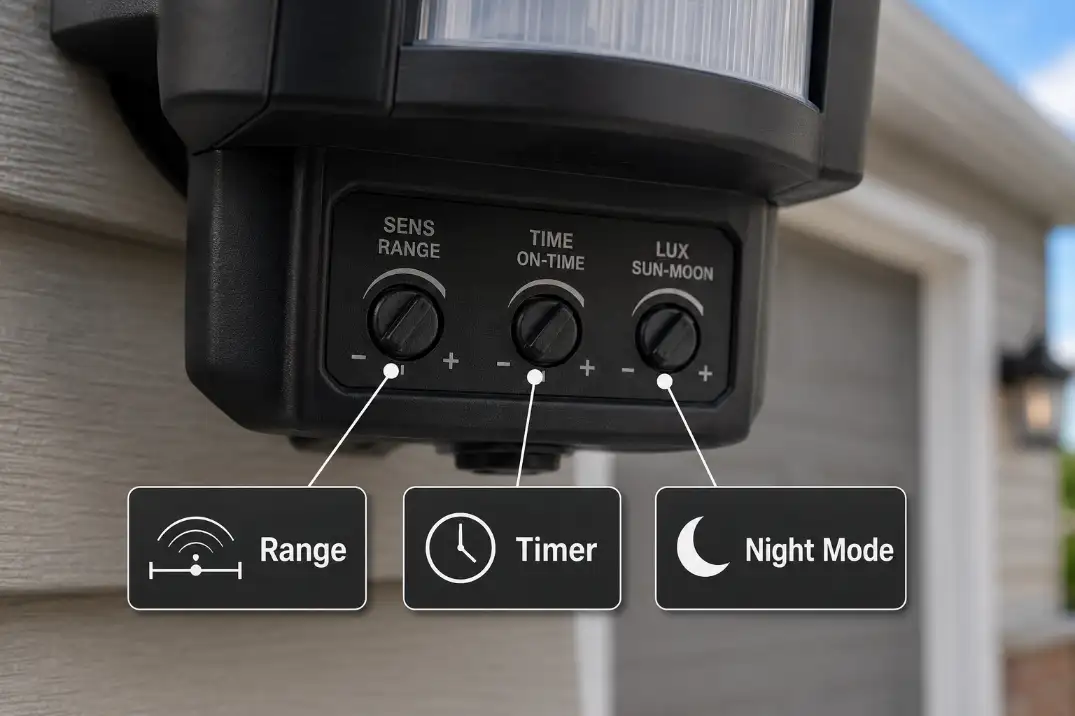
Most outdoor motion lights have three controls that matter: sensitivity, time, and sometimes lux or day/night. Sensitivity controls how easily motion is detected.
Time controls how long the light stays on after activation. Lux controls whether the fixture can activate before full darkness.
Start with the sensor head, not the dial
The most common mistake is turning the sensitivity dial down before checking where the sensor is pointed. Passive infrared sensors do not “see” like a camera.
They react to heat movement crossing detection zones. If the sensor is tilted toward a sidewalk, street, neighbor’s driveway, or moving tree line, lowering sensitivity may only make the light less reliable while still leaving the bad trigger inside the detection area.
Aim the sensor slightly lower than feels intuitive. For many wall-mounted security lights, a sensor aimed toward the ground about 8–12 feet from the wall gives cleaner results than one aimed straight across the yard.
If the fixture is mounted high, small angle changes matter. A sensor tilted upward by only 10–15 degrees can start catching street traffic or waving branches instead of the walkway below.
If your fixture also cycles after activation, the issue may overlap with wiring, heat buildup, or control behavior covered in Outdoor Motion Light Turning On and Off, but sensitivity should still be corrected first because it is the cheapest and most common fix.
Reduce sensitivity in stages
Set sensitivity around halfway, not at the minimum. Then walk across the target area at night from left to right and right to left. Motion sensors often detect sideways movement better than movement straight toward the fixture, so a light that misses you head-on but catches cars crossing the driveway is not unusual.
After each adjustment, wait at least 30–60 seconds before testing again. Many fixtures need a short reset period after activation, and testing too quickly can make a good adjustment look unreliable.
Pro Tip: Test from the farthest point you actually care about, not from directly under the light. If the light catches you at 25 feet but also catches traffic at 60 feet, the coverage is too broad.
What People Usually Misread First
A sensitive motion light is easy to misdiagnose because the lamp looks like the problem. In most cases, the lamp is simply obeying a poorly aimed or overly broad sensor.
Bright light does not mean strong detection
Brightness and sensitivity are separate issues. A 3,000-lumen floodlight can have a badly aimed sensor, and a dimmer fixture can still detect motion too far away. Swapping to a lower-wattage bulb may reduce glare, but it usually will not stop false triggering.
Replacing the bulb is one of the least useful first moves unless the light is flickering, dim, or failing to turn on. False triggering is controlled at the sensor, not at the lamp.
If the fixture creates harsh bright spots but still leaves useful areas dark, that is a beam and placement problem more than a sensor problem. That pattern is better handled through aiming and coverage changes like those discussed in Outdoor Lights Bright Spots and Dark Gaps.
Wind is not the trigger; moving heat contrast is
Wind itself usually does not trigger a passive infrared motion sensor. What matters is what the wind moves. A cool branch passing across a warm wall, or a shrub moving in front of heat stored in concrete, can create the temperature shift the sensor reacts to.
That is why false triggers often get worse in the first 1–3 hours after sunset. Pavement, brick, siding, and parked vehicles may still be warmer than the surrounding air.
In dry desert areas such as Arizona, hardscape can radiate heat well into the evening. In humid parts of Florida, dense vegetation near the fixture may be the bigger issue because it stays close to the sensor year-round.
Small animals are usually a clue, not the real cause
A cat, raccoon, or dog should not trigger a properly aimed driveway light from 40 or 50 feet away. If small animals keep activating the fixture, the sensor is probably angled too low across a wide open zone or set near maximum sensitivity.
The animal is the visible trigger. The underlying mechanism is excessive detection width.
Sensitivity, Time, Lux, and Sensor Type
Use the controls in the right order. Adjusting the time setting will not make the sensor less sensitive. It only changes how long the light stays on after the sensor has already been triggered.
Translate the labels before adjusting
Depending on the brand, sensitivity may be labeled SENS, RANGE, or DISTANCE. Timer controls may say TIME, ON-TIME, or show minute markings. Lux controls may be labeled LUX, DUSK, DAY/NIGHT, SUN/MOON, or PHOTOCELL.
Treat the label by function, not exact wording. The wrong dial can send you in circles.
| Control | What it changes | Useful starting point | What it will not fix |
|---|---|---|---|
| Sensitivity / Range | How far or easily motion is detected | 40–60% of maximum | Bad sensor direction |
| Time / Duration | How long the light stays on | 30–90 seconds | False triggering |
| Lux / Day-Night | Darkness level required for activation | Night-only or moon symbol | Street-facing detection |
| Test Mode | Temporary daytime testing | Use only during setup | Normal night operation |
| App Motion Zone | Where a smart fixture watches for motion | Exclude street/sidewalk first | Bad physical sensor angle |
| Manual Override | Forces light on from wall switch | Off for troubleshooting | Sensor calibration |
Check what kind of sensor you have
Most residential outdoor floodlights use PIR sensing, which reacts to heat movement. That is why people, pets, warm vehicles, dryer vents, and sun-warmed pavement can all matter.
Some newer smart security lights use microwave, radar, camera-based, or dual-technology detection. These can behave differently around reflective surfaces, moving branches, thin doors, or app-defined motion zones. On camera floodlights, the motion alert zone and the light activation zone may not be the same setting.
If your smart light keeps notifying you but the floodlight does not always turn on, or the light turns on while app alerts seem normal, check both settings. Do not assume one sensitivity slider controls the whole system.
Step-by-Step Adjustment That Usually Works
This sequence avoids the two biggest time-wasters: replacing parts too early and turning every setting to minimum.
1. Clean the sensor lens
Wipe the sensor lens with a damp cloth and dry it. Dust, spider webs, pollen, insect debris, and hard water spots can interfere with detection patterns. This is common under eaves, near porch lights, and around garage fixtures where insects gather.
Cleaning will not fix a badly aimed sensor, but it removes a cheap variable before you make finer adjustments.
2. Reset only when reset makes sense
Reset the light first if the behavior changed after a power outage, switch flipping, test mode, or someone quickly toggling the wall switch. Many motion lights can be forced on by flipping the switch off and back on quickly. Turn the switch off for 30 seconds, then back on. Some fixtures need 60–90 seconds to stabilize.
If the light shuts off normally but activates too often, do not keep resetting it. That is usually a detection-zone problem, not a memory problem.
If the light only misbehaves after test mode or a power reset, the issue may be mode-related rather than sensitivity-related. That pattern is explained more directly in Outdoor Security Light Test Mode Not Working at Night.
3. Aim for the useful path, not maximum range
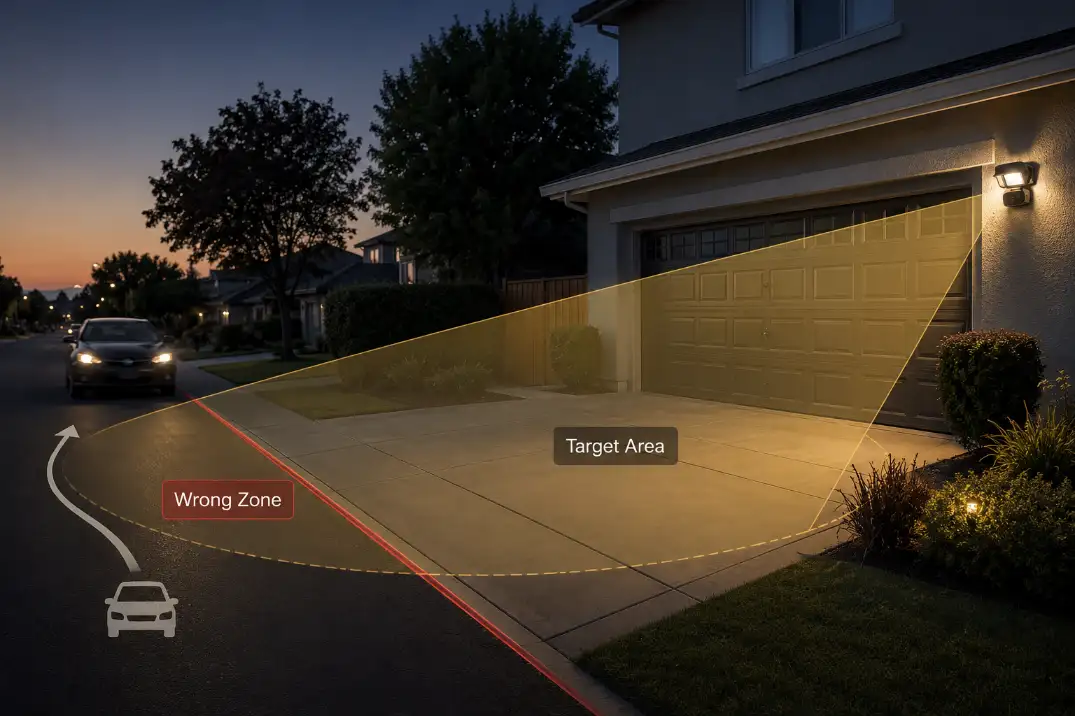
Stand where you actually want detection: the driveway edge, walkway, gate, steps, or side door. Aim the sensor so its detection field crosses that path, not the entire yard. For many homes, the useful zone is roughly 10–30 feet from the fixture. Longer reach can help on a long driveway, but it becomes less precise near streets, sidewalks, and moving landscaping.
Do not aim the sensor directly at HVAC exhaust, dryer vents, reflective glass, parked cars, or sun-warmed masonry. Those surfaces can create heat changes that look like motion to the sensor.
Do not loosen or reposition a hardwired fixture body while it is powered. Adjust only the movable sensor head from a stable position. If the fixture is above comfortable ladder height, has water inside the housing, has a cracked sensor lens, or buzzes when active, adjustment is no longer the safe first step.
4. Test sideways movement at the far edge
Walk across the detection zone, not just toward the light. If the light does not activate at the edge of the useful area, raise sensitivity slightly. If it activates when you move outside the useful area, lower sensitivity or tilt the sensor down.
The goal is not maximum reach. A healthy setup catches a person crossing the target zone at 15–25 feet and ignores movement beyond the property edge. An over-sensitive setup may react to cars or pedestrians 50–70 feet away.
5. Adjust time after sensitivity is correct
Once detection is clean, set the duration for how you use the area. A side door may only need 30–60 seconds. A driveway or trash area may need 1–3 minutes. Long settings are useful only when the trigger zone is already controlled.
If the light stays on for 5, 10, or 20 minutes, one false trigger can look like a fixture that never shuts off. During troubleshooting, keep the timer short.
If the fixture remains on all night even with a short timer, you are no longer dealing with simple sensitivity. That pattern points toward override mode, photocell confusion, wiring, or a failed sensor, which is covered in Motion Sensor Light Stays On All Night.
Pro Tip: If you need the light to stay on longer, extend the timer last. A long timer makes false triggers feel worse because every unnecessary activation lasts longer.
When Adjustment Stops Making Sense
Sensitivity adjustment has limits. If the sensor is seeing the wrong area because the fixture is mounted in the wrong place, no dial setting will make it perfect.
The fixture is too high or too exposed
A sensor mounted high on a garage gable can cover too much area, especially if it faces a street or open driveway. Mounting height around 6–10 feet is often easier to control than a high fixture aimed outward from 14 or 16 feet.
Higher placement can still work, but it needs tighter downward aiming and sometimes a narrower detection pattern.
If the light misses the target area after you narrow the sensor, the problem may be placement rather than sensitivity.
A fixture that cannot cover the desired space without also watching the street belongs in the broader category of Outdoor Lights Miss the Target Area.
The environment keeps creating heat movement
Some false triggers are seasonal. In northern states, freezing nights can make warm vents, cars, and walls stand out sharply against cold air. In the Midwest, windy storm fronts can move branches across warm siding.
Near coastal California, moisture and salt air may not cause sensitivity directly, but they can age fixtures and controls faster.
Trim vegetation back at least 12–18 inches from the sensor’s direct view when possible. Keep moving branches out of the first 10 feet in front of the lens. That near zone matters more than distant movement because it crosses more of the sensor’s detection pattern.
The sensor may be aging or failing
If the light triggers with no movement after cleaning, aiming, resetting, and reducing sensitivity, the sensor may be unstable.
A practical threshold: if the fixture still activates more than 3–4 times per hour on a calm night with no traffic, pets, or branch movement in the detection area, adjustment has probably reached its limit.
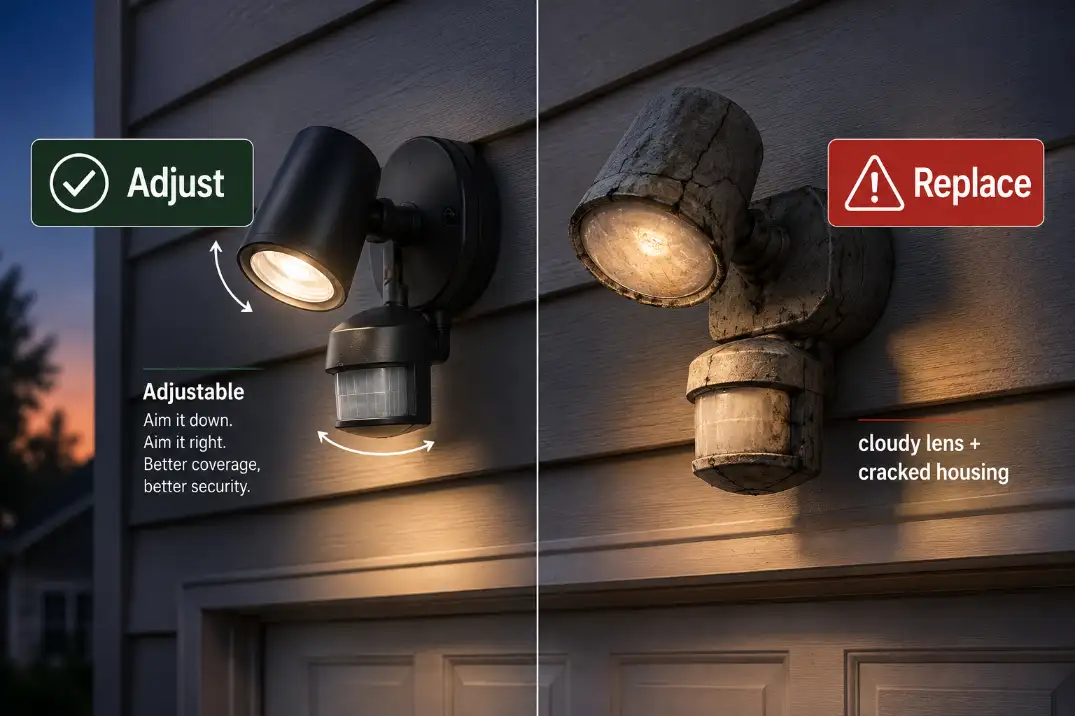
At that point, replacing the sensor head or fixture makes more sense than continuing to tweak the dials. This is especially true if the fixture is several years old, has visible water staining, a cracked lens, buzzing relays, or inconsistent shutoff timing.
Quick Diagnostic Checklist
Use this before buying a replacement fixture:
- Light triggers from cars or pedestrians beyond 40–50 feet: sensor is aimed too far or set too high.
- Light stays on longer than expected but shuts off eventually: timer setting is probably too long.
- Light activates in daylight: lux setting or test mode needs correction.
- Light triggers mostly after sunset: warm pavement, walls, or vehicles may be creating heat contrast.
- Light changed behavior after switch flipping or outage: reset/manual override is worth checking first.
- Light triggers on calm nights with no visible movement: lens contamination, wiring, or internal sensor failure is more likely.
- Light misses people but catches traffic: detection zone is crossing the wrong path.
Questions People Usually Ask
Should I cover part of the sensor with tape?
Sometimes, but it should be a last resort for shaping a detection zone, not the first fix. Outdoor-rated sensor shields or manufacturer-provided masks are better than random tape because adhesive can fail in rain, heat, or freezing weather. If a small shield solves street triggering without reducing useful driveway coverage, it can be reasonable.
Why does my motion light trigger more in winter?
Cold air makes warm objects stand out more sharply. A car engine, dryer vent, or sun-warmed wall can create a stronger heat contrast on a 25°F night than on a 70°F evening. The sensor is not becoming more sensitive by itself; the environment is giving it stronger signals.
Is lower sensitivity always safer?
No. Too little sensitivity can create a false sense of security because the light may miss people near the edge of the walkway or driveway. The better target is controlled sensitivity: enough to detect a person in the useful zone, not enough to watch the street.
When should I replace the whole light?
Replace it when the sensor lens is cloudy or cracked, the fixture reacts inconsistently after reset, water has entered the housing, or false triggers continue after aiming, cleaning, and medium-to-low sensitivity testing. A new fixture is often more sensible than spending hours trying to tune a sensor that no longer behaves predictably.
For broader official guidance on efficient outdoor lighting controls, see the U.S. Department of Energy.