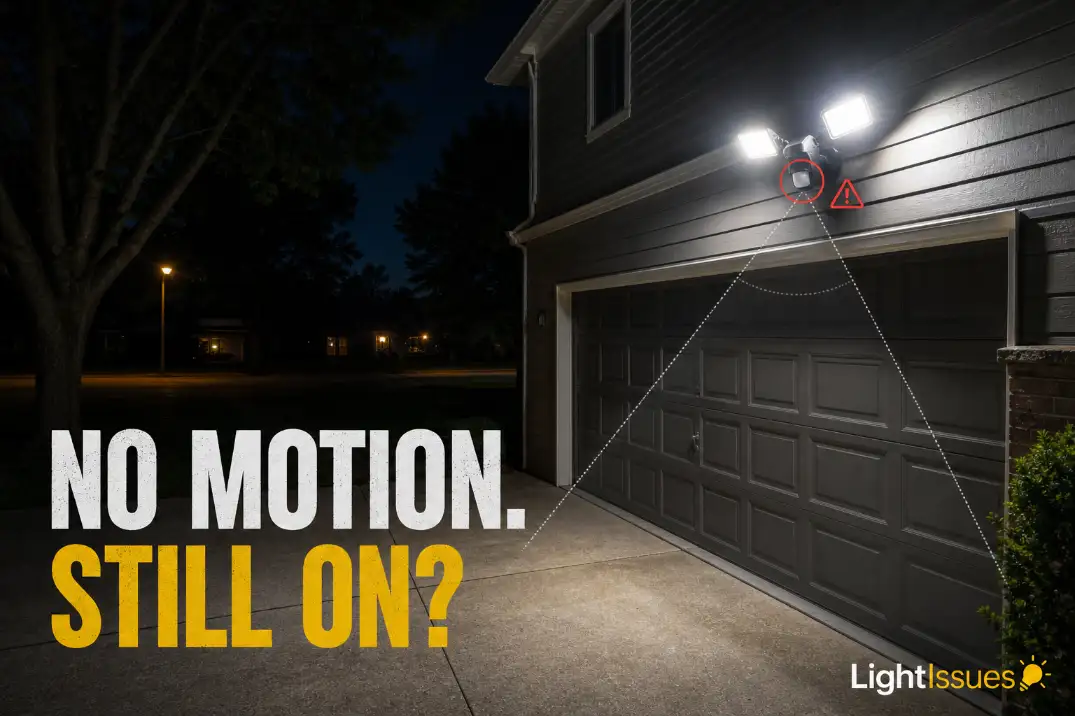
If a motion sensor light stays on all night, start with the simplest high-probability fix: turn the wall switch off for 30–60 seconds, then turn it back on once.
If the light shuts off normally after that, it was probably stuck in manual override or recovering from a control glitch. If it stays on past one full timer cycle, move to the timer, sensitivity, sensor aim, photocell, and moisture checks.
A healthy motion light usually turns off within about 30 seconds to 10 minutes after the last detected movement, depending on the setting. Some fixtures allow 15–20 minutes at maximum delay, but an all-night glow with no motion nearby is not normal motion behavior.
This is different from a motion light that will not turn on at all. Here, the fixture clearly has power; the problem is that the control logic is being overridden, retriggered, or misled.
Quick Diagnostic Checklist
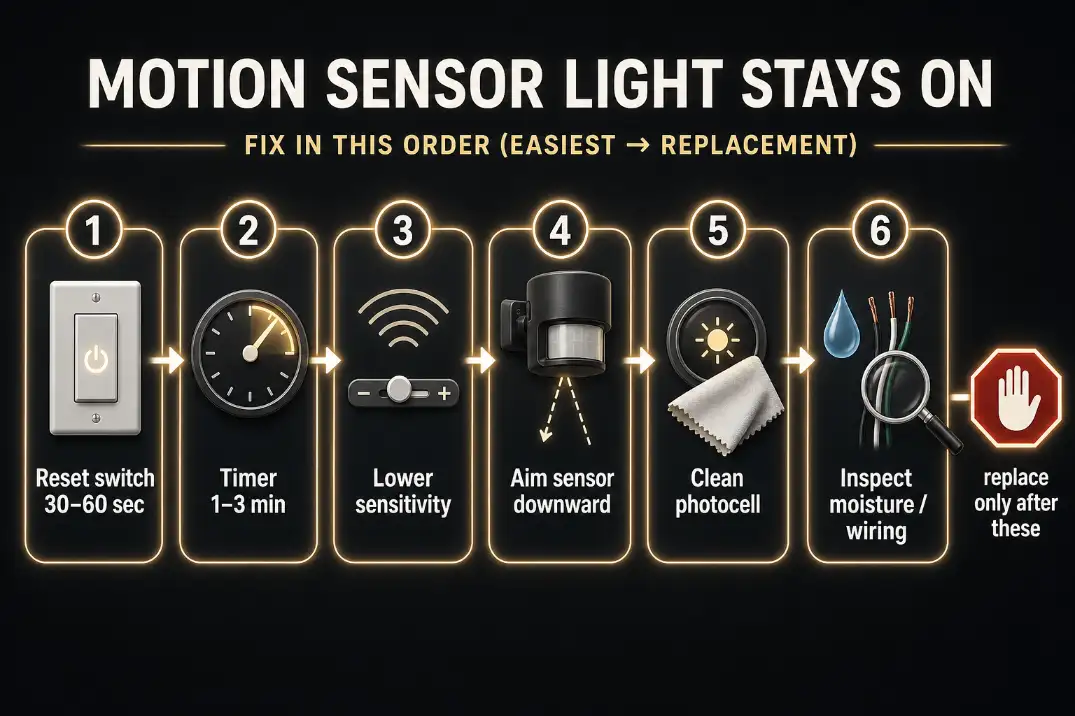
Use this order before replacing anything:
- Reset the wall switch or breaker for 30–60 seconds.
- Set the timer to its shortest testable delay, often 30 seconds to 3 minutes.
- Lower sensitivity one step and retest after dark.
- Aim the sensor away from roads, trees, vents, reflective glass, and parked cars.
- Clean the photocell and make sure it is not covered, painted, shaded, or facing another light.
- Check for moisture, corrosion, or wiring trouble if the problem started after rain.
- Look for smart switch, dimmer, or app schedules that may be keeping the fixture powered on.
The most common mistake is replacing the bulb first. If the light is bright and steady, the bulb has already proven that the lamp can receive power. The issue is usually upstream: switch mode, sensor logic, photocell input, or wiring condition.
What “Stays On” Usually Means
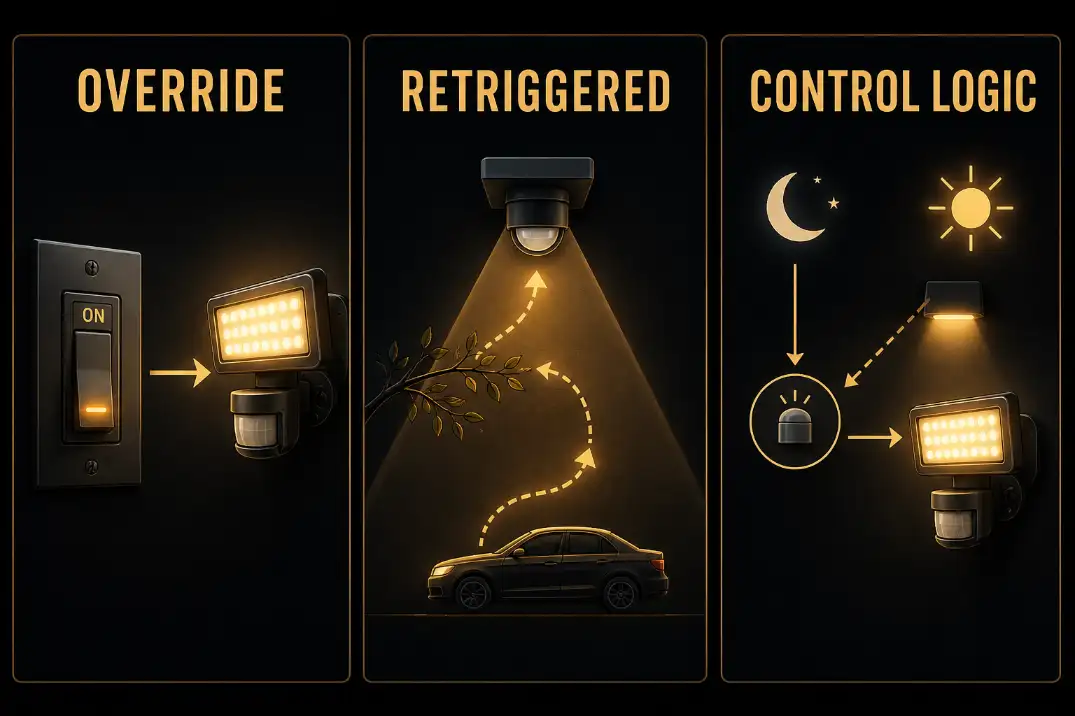
Locked on by switch mode
Some fixtures have a manual override feature. A quick off-on-off-on switch pattern can tell the fixture to stay on continuously instead of waiting for motion. This often happens after someone flips the switch repeatedly while testing the light or after a power interruption.
Retriggered by the environment
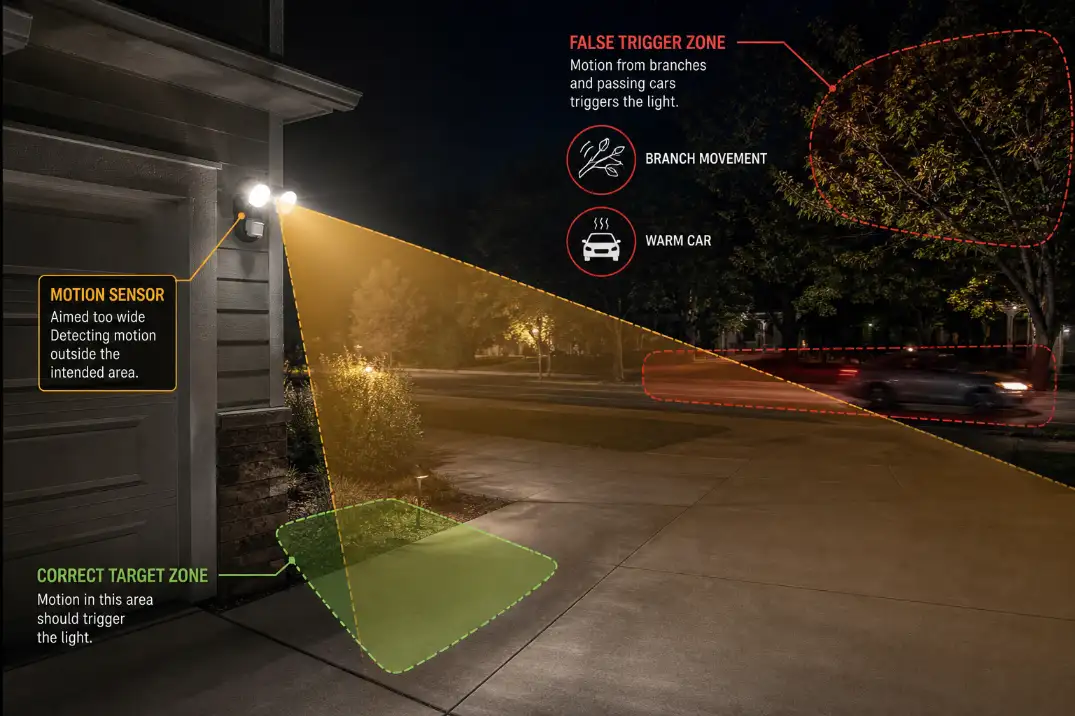
The sensor may not be stuck at all. It may be seeing repeated motion from a branch, a pet, traffic, HVAC exhaust, dryer vent air, or a warm vehicle crossing the detection zone. In that case, the timer keeps restarting before the light has a chance to shut off.
Allowed on by timer or photocell logic
Sometimes the light is simply set to stay on too long, or the photocell thinks it is dark enough to keep the fixture active. This is why “only at night” and “day and night” are not the same symptom. A light that stays on only after dark usually points toward motion settings, timer delay, or false triggers. A light that stays on 24 hours a day points more strongly toward photocell failure, bypassed controls, or wiring trouble.
Cause 1: The Wall Switch Put the Light Into Manual Override
Why this comes first
Manual override is the fastest thing to rule out because it takes less than a minute and does not require tools. Many motion floodlights are designed to stay on continuously when the wall switch is toggled quickly.
That feature is useful when you want steady light for a driveway, patio, or late-night cleanup, but it can look like a failure if it was triggered accidentally.
Turn the wall switch off, wait 30–60 seconds, then turn it back on once. Do not flip it repeatedly afterward. If there is no wall switch, use the breaker instead, but only if it safely controls the fixture circuit.
After restoring power, wait through one full timer cycle. If the fixture is set to 5 minutes, give it the full 5 minutes after the last motion. Judging it after 45 seconds can send you chasing the wrong problem.
When this explanation fits best
Manual override is especially likely if the light started staying on after a power outage, breaker reset, or quick switch testing. It also fits when both heads of a dual-head floodlight stay on steadily at full brightness, with no flicker, dimming, or weather-related pattern.
If the fixture turns off after the reset but later gets stuck again, someone may be reactivating override from the switch. A small label near the switch can prevent the same issue from returning.
Cause 2: The Timer or Test Mode Is Misleading You
Long delay can look like failure
Motion lights do not all shut off quickly. Some have timer ranges from 30 seconds to 20 minutes. If the dial is near maximum, the light may seem stuck while it is actually waiting out a long delay.
Set the timer to its shortest practical setting for diagnosis. Then walk out of the detection zone and watch from inside or from behind the sensor. Standing in front of the fixture keeps restarting the countdown.
A practical threshold: if the light turns off within the selected timer window after the last movement, the sensor is probably not stuck. If it remains on beyond two full timer cycles with no movement, move to sensitivity, aim, photocell, or wiring.
Use test mode only for diagnosis
Some fixtures have a test mode that shortens the delay to a few seconds or bypasses dusk-only behavior temporarily. That is useful for aiming the sensor, but it is not the normal operating mode.
After testing, return the control to auto, normal, or night mode. Leaving the fixture in test mode can make it behave differently from what you expect after dark. If the controls are tiny, take a phone photo before adjusting them so you can restore the original positions.
Cause 3: Sensitivity Is Too High for the Location
PIR sensors detect heat movement
Most residential motion lights use PIR sensing. They do not understand whether a person is approaching the door. They react to changes in infrared heat moving across the detection zone.
That means a person walking across the driveway is easy to detect, but so are warm cars, pets, wind-blown branches, dryer exhaust, and HVAC discharge. A sensor rated for 40–70 feet can easily catch sidewalk or street movement if sensitivity is high and the sensor faces outward.
Lower sensitivity one step at a time. Do not immediately turn it to minimum unless the fixture is in a very active location. The goal is to stop nuisance triggers without making the light useless for real approach paths.
This is the opposite of a no-response problem. If your fixture does not detect movement at all, the troubleshooting path is closer to Outdoor Motion Sensor Light Not Working. A light that stays on usually needs less detection area, not more.
What people overestimate and underestimate
People often overestimate how still their yard is at night. A branch moving 6 feet from the sensor may look harmless, but if it crosses the sensor field every few minutes, the light never reaches its off cycle.
They also underestimate reflected and heat-based triggers. Wet pavement, glossy garage doors, parked vehicles, glass doors, and light-colored walls can create changes that are more noticeable to the sensor than they are to the eye.
Pro Tip: Test sensitivity after dark. Sun-warmed siding, asphalt, and vehicles can distort daytime testing, especially in hot climates like Arizona or during summer heat waves.
Cause 4: The Sensor Head Is Aimed at the Wrong Area
Aim decides what the sensor is allowed to see
Sensitivity controls how easily the sensor reacts. Aim controls what the sensor watches in the first place. A medium-sensitivity sensor aimed correctly is usually better than a low-sensitivity sensor pointed at the street.
For a garage, porch, or side-yard light, the sensor should usually cover the first 15–30 feet of the driveway, walkway, or entry path. It should not cover the full road, neighbor’s yard, tree line, or sidewalk unless that is truly the area you want to monitor.
Small changes matter. Rotating the sensor 10–15 degrees away from traffic or angling it slightly downward can stop repeated triggers without sacrificing useful coverage.
Cross-motion matters
PIR sensors detect movement across their field better than movement straight toward them. If the sensor is aimed directly down a long driveway, it may miss some approach movement but catch passing cars moving across the edge of the zone. That combination creates bad performance: weak security where you need it, constant triggering where you do not.
If other outdoor lights are also acting unpredictably, the issue may not be one sensor head. A broader pattern belongs closer to Outdoor Lights Working Intermittently, especially when multiple fixtures change behavior at different times.
Cause 5: The Photocell Is Dirty, Blocked, or Confused
Night-only and 24-hour problems are different
A photocell decides whether it is dark enough for the motion light to operate. If the light stays on all night but turns off after sunrise, the photocell is probably still recognizing daylight. In that case, the motion side, timer, sensitivity, or aim is more suspicious.
If the light stays on during the day too, the photocell moves higher on the list. It may be covered by dirt, paint, caulk, fixture trim, or landscaping shade. It may also be failed, bypassed, or wired incorrectly.
Clean the photocell window with a soft cloth and make sure it can see daylight. Do not scrape it with a blade or permanently tape it over. If nearby porch lights, streetlights, white siding, reflective glass, or wet concrete confuse the fixture, the light may cycle or delay shutoff in ways that look like a bad motion sensor.
Solar motion lights need a separate check
If this is a solar motion light, battery voltage and panel charging can imitate sensor failure. A weak battery may keep the light in strange modes or fail to complete normal cycles. That situation overlaps more with Why Solar Outdoor Lights Fail So Quickly than with a hardwired floodlight reset.
Cause 6: Moisture or Wiring Trouble Is Holding the Circuit On
Weather-linked behavior deserves more caution
If the problem started after heavy rain, irrigation spray, snowmelt, or a freeze-thaw cycle, stop treating it as a simple dial adjustment. Moisture inside the fixture, corroded terminals, cracked gaskets, or damaged wiring can make a light stay on, flicker, trip a GFCI, or behave normally only after it dries out.
A useful pattern is timing. If the fixture behaves normally during dry weather but stays on after 24–48 hours of damp conditions, the sensor electronics or connections may be compromised.
Look for condensation inside the lens, rust stains, green or white corrosion on terminals, brittle insulation, water around the cable entry, or a loose gasket. Moisture is not just cosmetic. It can change electrical resistance paths and damage the control board. The broader failure pattern is covered in Moisture Damage in Outdoor Lighting Explained, especially when outdoor lights behave worse after storms.
Turn power off at the breaker before inspecting anything inside the fixture or box. If you find water in the electrical enclosure, burnt smell, repeated GFCI trips, or damaged insulation, another reset no longer makes sense. That is repair or replacement territory.
What Each Symptom Usually Means
| Symptom | More likely cause | Less likely cause | Best next move |
|---|---|---|---|
| Light stays on after quick switch use | Manual override | Bad bulb | Reset switch for 30–60 seconds |
| Light stays on after power outage | Control glitch or override mode | Bad bulb | Reset switch or breaker once |
| Light turns off after 10–20 minutes | Long timer setting | Failed sensor | Test at shortest timer setting |
| Light stays on only when windy | Branches or moving objects | Photocell failure | Re-aim sensor and lower sensitivity |
| Light stays on day and night | Photocell blocked, failed, or bypassed | Normal motion trigger | Clean and expose photocell |
| Light stays on after rain | Moisture, corrosion, or wiring leakage | Timer setting | Inspect with power off |
Check Controls Outside the Fixture
Smart switches can create false “fixture” problems
If the motion light is connected to a smart switch, dimmer, timer, or app-based schedule, check those controls before replacing the fixture. Some smart switches can keep a circuit energized in a way that interferes with sensor logic.
Dimmers are especially poor partners for many motion sensor floodlights unless the fixture specifically supports dimming.
Look for app schedules, vacation modes, dusk-to-dawn automations, or “always on” scenes. If the wall switch or app is forcing steady power behavior, fixture-level resets may not hold.
This is also where routine troubleshooting stops being efficient. Once you have reset the switch, shortened the timer, reduced sensitivity, corrected aim, cleaned the photocell, and ruled out outside controls, a fixture that still stays on is likely dealing with failed electronics, moisture damage, or wiring issues.
When Replacement Makes More Sense
Replace the sensor or fixture when the light remains on after a proper reset, shortest-timer test, sensitivity reduction, sensor re-aiming, photocell cleaning, and control check. Replacement also makes sense when the fixture has water inside, cracked seals, corroded contacts, or behavior that reliably changes after wet weather.
An outdoor sensor that has spent 8–12 years in sun, rain, humidity, and freezing weather may be near the end of its reliable life even if the housing still looks acceptable. Humid Florida yards, coastal California homes, and northern states with repeated freeze-thaw cycles can age gaskets and electronics faster than expected.
Integrated LED fixtures are often less repairable than older bulb-based floodlights. If the sensor board fails, replacing the whole unit may be cleaner than trying to revive a sealed control assembly. But do the reset and aiming tests first. Many “bad” motion lights are simply locked on or watching the wrong part of the yard.
Questions People Usually Ask
Why does my motion light stay on all night but turn off in the morning?
That usually means the photocell still recognizes daylight, but the motion side is being held active at night. Manual override, timer delay, high sensitivity, and false triggers are more likely than total photocell failure.
Why did my motion light stay on after a power outage?
A power interruption can mimic quick switch toggling on some fixtures and push the light into override or confuse the control board. Reset it by turning power off for 30–60 seconds, then back on once.
Can a bad bulb make a motion sensor light stay on?
Usually no. A bad bulb can fail, flicker, dim, or overheat, but it rarely tells the motion sensor to stay active. If the lamp is bright and steady, look at controls and sensing first.
Is it safe to leave a motion light on all night?
Occasionally, yes, but it wastes power and may point to a bigger issue if the behavior started after rain or electrical work. Turn power off and inspect safely if you notice buzzing, burning smell, water inside the fixture, heat damage, or repeated breaker/GFCI trips.
For broader official guidance on lighting controls, see the U.S. Department of Energy Lighting Controls guide.