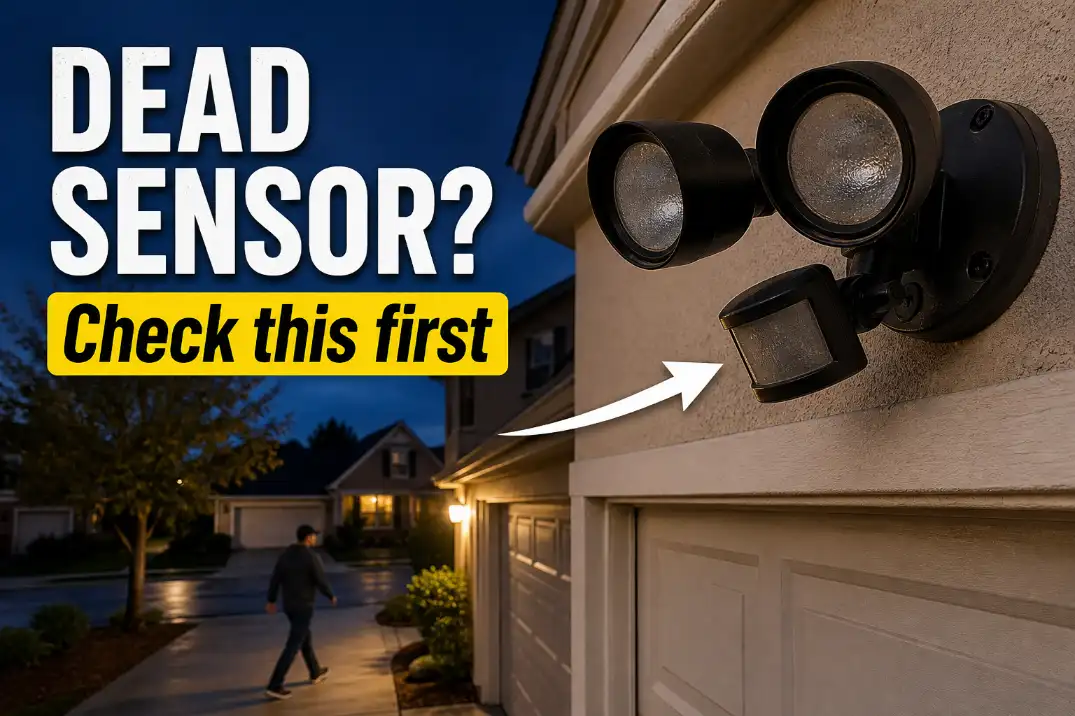
Most outdoor motion sensor lights do not fail randomly. They usually fall into one of four patterns: no power response, test-mode-only operation, constant-on behavior, or rain-related failure. The fastest fix depends on which pattern you have.
A light that never turns on should be treated as a power problem first; a light that works in test mode but not at night points toward the photocell or dusk setting; and a light that fails after rain is usually warning you about moisture, not sensitivity.
Start with a real reset, not a quick switch flip. Turn the wall switch off for 30–60 seconds, turn it back on, and wait 1–2 minutes before testing.
A healthy motion light usually triggers within 1–2 seconds, stays on for about 30 seconds to 5 minutes depending on the timer, and detects movement better across the sensor than straight toward it. If detection drops below about 10–15 feet after cleaning and aiming, the sensor may be degraded.
First Identify the Failure Pattern
It never turns on
If the light never turns on manually or by motion, sensor adjustment is not the first place to spend time. Check the wall switch, breaker, GFCI outlet, and any timer or smart switch feeding the fixture. Outdoor lights are often tied to a garage or exterior GFCI that may not be near the light itself.
For a standard hardwired fixture in the US, the expected supply is roughly 120 volts. For low-voltage landscape systems, the fixture may depend on a transformer output near 12 volts. If there is no confirmed power at the fixture, changing the sensor angle will not fix anything.
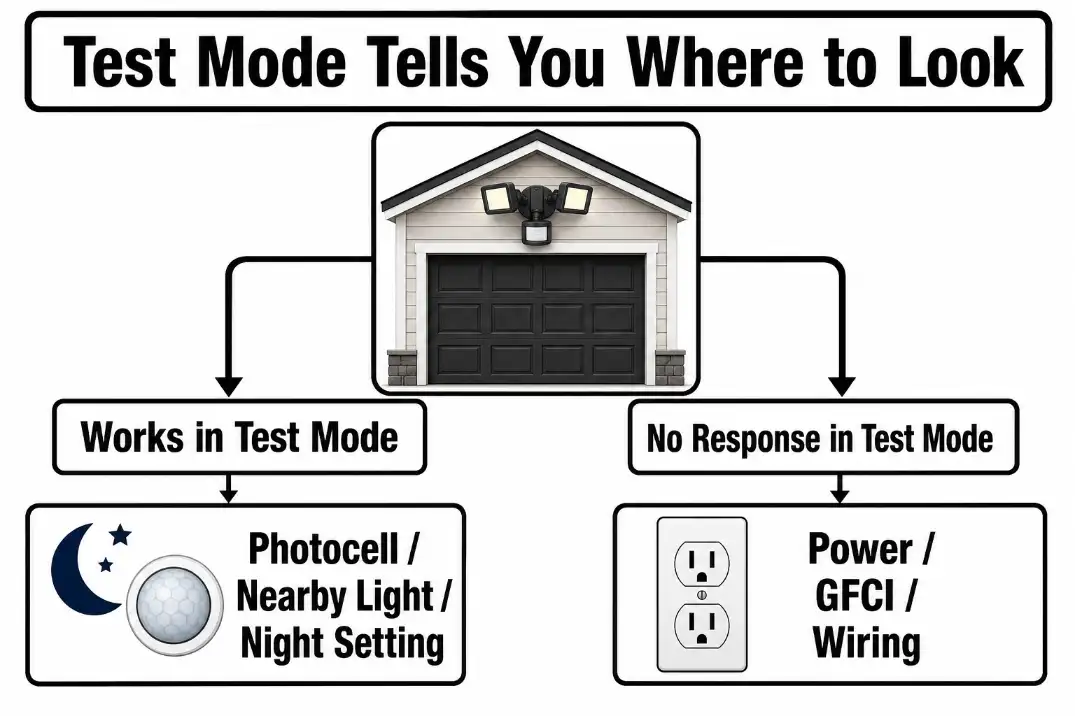
The useful distinction is simple: a motion light that never turns on is a power or fixture problem until proven otherwise. A motion light that turns on manually but not automatically is more likely a sensor, setting, photocell, or control problem.
It works in test mode only
Test mode often bypasses normal dusk-only behavior so you can aim the sensor during the day. If the light works in test mode but refuses to work in normal night mode, focus on the photocell, dusk setting, or nearby light source.
Porch lights, streetlights, reflective glass, white garage doors, and even light bouncing from a window can trick some fixtures into thinking it is still daytime. This is different from a fixture that works during the day but shuts off after dark, a pattern explained more deeply in Outdoor Lights Work in Day but Shut Off at Night.
It stays on or triggers randomly
A light that stays on all night is not the same problem as a light that never turns on. The likely causes are manual override mode, a timer set too long, sensitivity set too high, a moving heat source, or a failing relay inside the fixture.
Do not lower sensitivity blindly. First ask what the sensor is seeing. Dryer vents, HVAC exhaust, warm parked cars, pets, moving branches, and sun-warmed pavement can all create heat changes that look like motion to a PIR sensor. Sensitivity can reduce nuisance triggers, but it will not fix a bad aim angle or a nearby heat source crossing the detection zone every few minutes.
It fails after rain
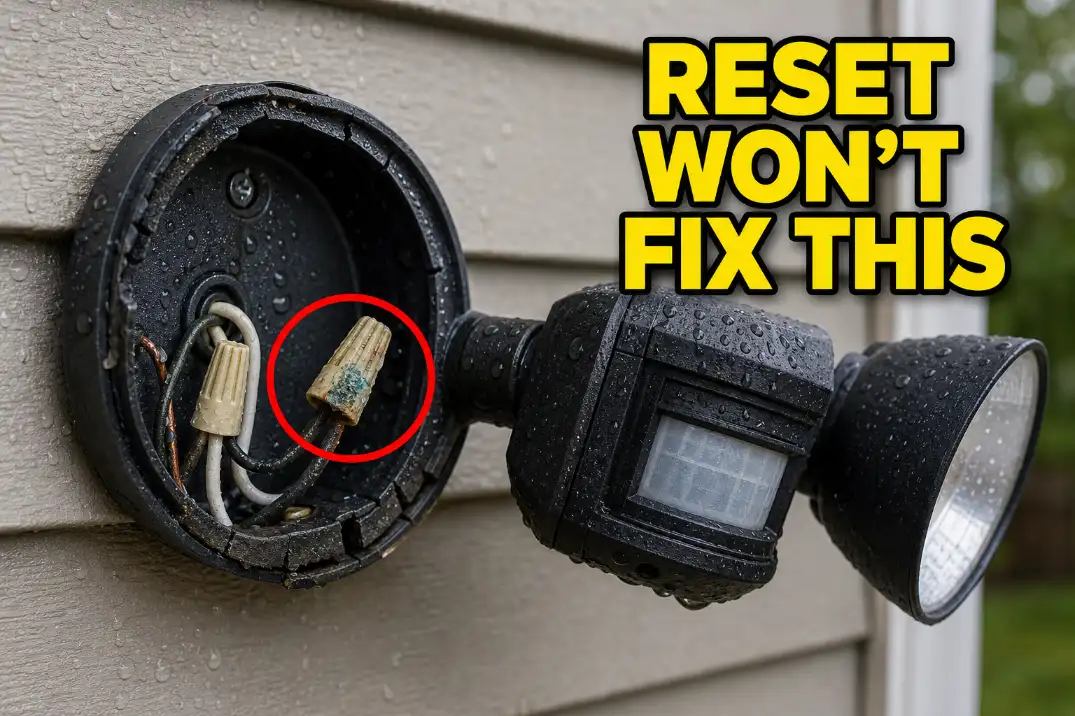
If the light works on dry nights but fails after storms, moisture deserves more attention than the sensor dial. Water can enter through the backplate, cable entry, cracked gasket, sensor housing, or wire connectors. In humid climates, moisture can remain inside a fixture for 24–48 hours after the outside looks dry.
One rain-related failure is a clue. Repeated rain-related failure is a repair boundary.
Reset It the Right Way Before Replacing Anything
Short switch flip vs real reset
Many motion lights use the wall switch for more than power. A quick off-on flip may put the light into manual override instead of resetting it. That is why a light can suddenly stay on, ignore motion, or behave differently after someone has flipped the switch several times.
Use a controlled reset first. Turn the wall switch off for 30–60 seconds, turn it back on, and wait 1–2 minutes before testing. If the fixture is connected through a breaker or GFCI, leave power off for about 1 minute before restoring it. Some digital or smart fixtures may need several minutes without power, but if a basic reset changes nothing, do not keep cycling power endlessly.
What a successful reset tells you
If the light starts working after a reset, the fixture is probably not dead. The issue was more likely a mode, timer, photocell, or temporary control glitch. That means the next useful step is controlled testing: set the timer low, use test mode if available, and adjust one setting at a time.
If the reset does not restore manual operation, move away from sensor settings. A fixture that cannot turn on manually may have a power problem, failed LED driver, bad lamp holder, loose connection, or damaged internal electronics.
Pro Tip: Set the timer to 30 seconds or 1 minute while testing. A 5-minute timer makes every adjustment feel like a new failure.
Test Mode, Night Mode, and Photocell Problems
The photocell decides whether the fixture thinks it is dark enough to operate. Many fixtures will not trigger in normal mode until ambient light drops below a dusk-level threshold. Exact thresholds vary, but the point is simple: a motion sensor can be healthy while the daylight control blocks operation.
Covering the photocell for 30–60 seconds can help, but do not expect every fixture to react instantly. Some lights delay the response to avoid false switching from headlights, shadows, or brief light changes.
| Test result | What it usually means | Next move |
|---|---|---|
| Works in test mode but not night mode | Photocell or dusk setting conflict | Check dusk control, nearby light, and reflective surfaces |
| Does not work in test mode | Power, bulb, LED driver, sensor module, or wiring issue | Check switch, GFCI, breaker, and fixture power |
| Turns on manually but not by motion | Sensor aim, dirty lens, sensitivity, or PIR failure | Clean lens and aim across the walking path |
| Trips GFCI after rain | Moisture leakage or wet wiring path | Inspect gasket, backplate, and cable entry |
| Stays on after reset | Override mode, heat source, stuck relay, or failed control | Lower timer, remove trigger source, replace if unchanged |
This table is more useful than guessing from the symptom alone. A bulb can be bad, but if the sensor never commands the light to turn on, bulb replacement is a side issue. The mechanism is control failure, not brightness failure.
Sensor Aim, Lens Dirt, and Detection Range
Why walking straight toward it may fail
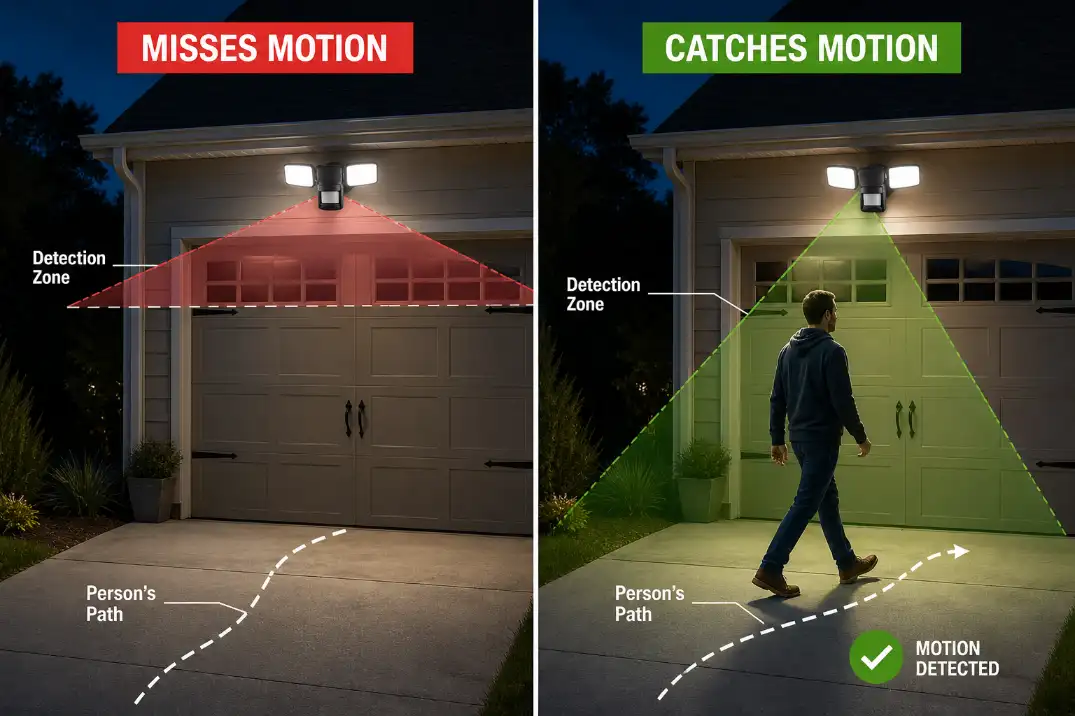
Most residential motion lights use a passive infrared sensor, or PIR sensor. It reacts to changes in heat across detection zones. That means side-to-side movement is usually easier to detect than someone walking directly toward the fixture.
For a garage, porch, or side-yard light mounted about 6–10 feet high, the sensor usually performs best when angled slightly downward and aimed across the route people actually take.
If the sensor points too high, it may watch the street, tree canopy, or empty driveway air. If it points too low, it may only detect motion within a few feet of the wall.
A common overestimate is the advertised detection range. A fixture may claim 40, 50, or 70 feet, but useful range drops when the lens is dirty, the angle is wrong, the target moves straight toward the sensor, or the background temperature is close to body temperature.
In hot weather above about 85°F, PIR sensors can seem less responsive because the heat contrast is smaller.
When sensitivity helps and when it does not
Sensitivity is not a magic repair setting. It helps only after the sensor is clean, aimed correctly, and receiving power. If the lens is cloudy with pollen, spider webs, oxidation, or paint overspray, increasing sensitivity may only create random triggers while still missing the intended walking path.
Clean the sensor lens with a soft damp cloth. Then test from several angles. If the light reliably triggers at 25–40 feet after cleaning and aiming, the sensor is probably healthy. If it still detects only within 10–15 feet in normal temperatures, the sensor lens or electronics may be aging.
This is where many people underestimate physical blockage. A porch column, parked SUV, storm door frame, shrub, fence post, or decorative trim can cut the detection zone in ways that are not obvious from the ground.
Power, GFCI, Moisture, and Wiring Problems
When no power is more likely than a bad sensor
If the fixture does not respond to manual mode, test mode, or reset, power should move to the top of the list. Check the obvious switch first, then the breaker, then nearby GFCI outlets. Exterior lighting may be protected by a GFCI in the garage, basement, porch, or another outdoor receptacle.
If the GFCI trips again immediately, do not keep resetting it. That is not troubleshooting; it is ignoring a fault. Moisture, damaged insulation, or a failing fixture can leak current and cause repeated trips. This pattern overlaps strongly with Outdoor Lights Tripping GFCI Outlets, especially when the problem appears after rain.
Why rain changes the diagnosis
Rain changes the priority order. A dry-weather failure can be settings, aim, power, or electronics. A wet-weather failure points more strongly toward water intrusion, corrosion, or a compromised connection.
Look for fogging inside the lens, rust stains below the fixture, green or white corrosion on metal parts, brittle gaskets, swollen wire connectors, or water inside the backplate.
In freezing northern states, trapped water can expand and worsen a marginal connection. Near coastal areas, salt air can speed corrosion even when the fixture is not directly soaked.
If moisture keeps returning, the fix is not just drying the fixture. The entry path has to be corrected. For a deeper explanation of how water damages outdoor fixtures, see Moisture Damage in Outdoor Lighting Explained.
When loose wiring becomes the real issue
Loose wiring often looks like sensor failure because the fixture behaves unpredictably. It may flicker, trigger once and shut down, work when bumped, or fail after wind, vibration, heat, or moisture.
Turn off power before opening any fixture. If you see scorched insulation, melted connectors, cracked wire nuts, exposed copper, or corrosion inside the box, stop treating the problem as a sensor adjustment. The repair logic is closer to Loose Outdoor Wiring Connections than to motion sensitivity.
What Changes by Motion Light Type
Hardwired floodlights
Hardwired motion floodlights depend on the wall switch, line-voltage supply, sensor head, photocell, internal relay, and fixture wiring. These are the lights where switch reset, GFCI checks, backplate inspection, and voltage safety matter most.
If the light is integrated LED, there may be no separate bulb to replace. A failed LED driver or sealed sensor board may mean the fixture has to be replaced as a unit.
Solar motion lights
Solar motion lights add a different failure layer: battery charge. A solar fixture may have a working motion sensor but still fail because the panel is shaded, the battery is weak, or winter sunlight is too limited. If the panel receives less than 4–6 hours of strong sun, nighttime performance can drop sharply.
That broader failure pattern is covered in Why Solar Outdoor Lights Fail So Quickly.
Smart camera floodlights
Smart floodlights and camera lights add app settings to the diagnosis. The problem may be a motion zone, schedule, privacy mode, Wi-Fi drop, firmware issue, or device offline state. If the light works manually in the app but not automatically, check motion zones and schedules before opening the fixture.
If the light does not respond in the app or at the switch, return to the basics: power, breaker, GFCI, and wiring.
When to Replace the Sensor or the Whole Fixture
Replace after failed range recovery
Replacement starts making sense when the light has power, resets correctly, the lens is clean, the sensor is aimed across the walking path, and detection still remains weak. If range stays under 10–15 feet in normal conditions, the PIR sensor or lens may be worn out.
Some fixtures allow a separate sensor head replacement. Many newer budget LED security lights do not. If the sensor, LED heads, and control board are integrated into one sealed body, replacing the whole fixture is usually more practical than trying to save one part.
Replace the whole fixture when water has reached the housing
If water has reached the sensor head, LED housing, or wiring compartment more than once, replacement is usually smarter than another reset. A new sensor will not last if the fixture body still lets water in.
This is especially true when the gasket is brittle, the mounting plate is warped, the cable entry faces upward, or corrosion has spread across terminals. Once corrosion becomes structural rather than cosmetic, cleaning contacts may buy time but rarely restores long-term reliability.
Call an electrician when reset stops being safe
Some fixes are reasonable for a homeowner: cleaning the lens, adjusting aim, resetting the switch, changing settings, or replacing an accessible bulb. Others are not worth guessing through.
Call an electrician if the breaker trips repeatedly, a GFCI will not reset, wires look scorched, the fixture contains standing water, voltage is unknown, or the box behind the light is loose or damaged. The routine fix stops making sense once the failure involves line voltage, repeated protection trips, or visible heat damage.
Questions People Usually Ask
Why does my motion sensor light stay on all night?
The most likely causes are manual override mode, timer setting, high sensitivity, a nearby heat source, or a stuck relay. Reset the switch for 30–60 seconds first. If the light still stays on with the timer set low and no obvious trigger source, the control module may be failing.
Why does it work in test mode but not at night?
That usually points to the photocell or dusk setting. Test mode may bypass normal daylight blocking. Nearby lights, reflective surfaces, or a porch light can make the fixture think it is not dark enough to operate.
Is the bulb or the sensor more likely bad?
If the fixture clicks, triggers, or sends power but the lamp does not illuminate, the bulb or LED driver may be the issue. If the fixture never reacts to motion, test mode, or reset, the sensor, power supply, wiring, or control board is more likely than the bulb alone.
For broader electrical safety guidance around outdoor circuits and GFCI protection, see the U.S. Consumer Product Safety Commission GFCI fact sheet.