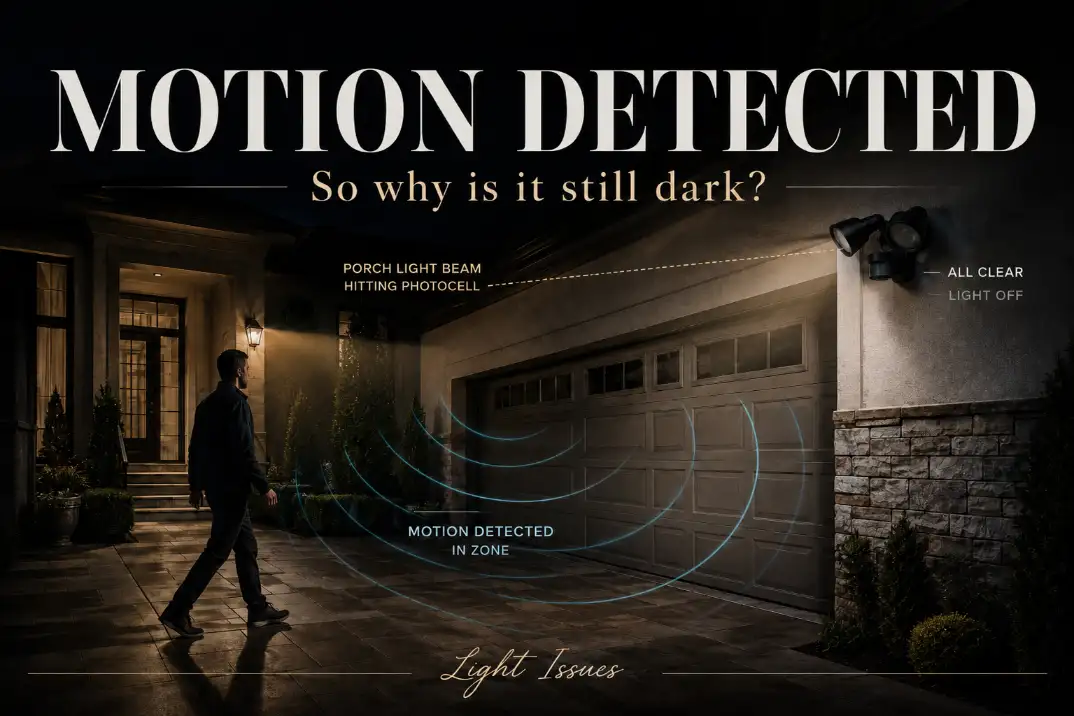
A motion sensor light that won’t turn on at night is usually being stopped before the lamp ever gets permission to light. The first split is simple: does it fail in TEST or manual mode, or does it only fail in AUTO mode after dark?
If it fails in every mode, think power, wall switch, GFCI, wiring, or a dead fixture. If it works in TEST mode but not at night, the photocell, LUX setting, nearby light, or sensor aim is more likely.
A healthy hardwired motion light should usually respond within 1–3 seconds when someone crosses the detection zone, often within about 10–40 feet depending on the model and mounting height.
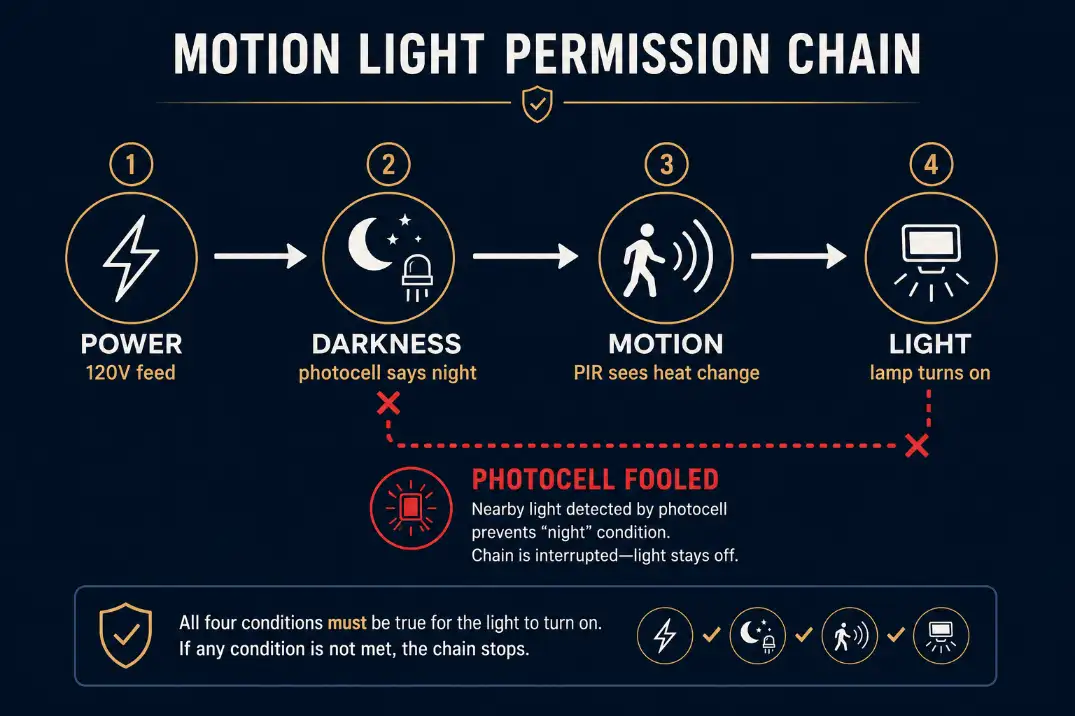
This is different from a motion light that keeps turning on and off. That pattern usually points to false triggers or cycling. Here, the real issue is a permission chain: power, darkness, motion, then light.
Start Here: What Happens When You Test It?
| What happens | Most likely category | First useful move |
|---|---|---|
| No response in TEST or manual mode | Power, wiring, dead fixture | Check switch, breaker, GFCI, and fixture power |
| Works manually but not with motion | Sensor aim, settings, or sensor failure | Walk across the detection zone, not straight toward it |
| Works in TEST but not AUTO at night | Photocell, LUX setting, nearby light | Cover the photocell for 60–90 seconds |
| Works after reset, then fails again | Override mode or unstable electronics | Reset correctly and avoid rapid switch toggling |
| Fails after rain | Moisture, corrosion, splice issue, GFCI | Inspect seals, fixture box, and wire connectors |
| New fixture never worked | Wiring, mode setting, dimmer/timer conflict | Recheck installation and operating mode |
This table matters because replacing the bulb is often the wrong first move. A bulb can be bad, but if the fixture has no response in TEST mode, or all lamp heads stay dead, the problem is usually upstream.
With integrated LED security lights, there may not even be a replaceable bulb.
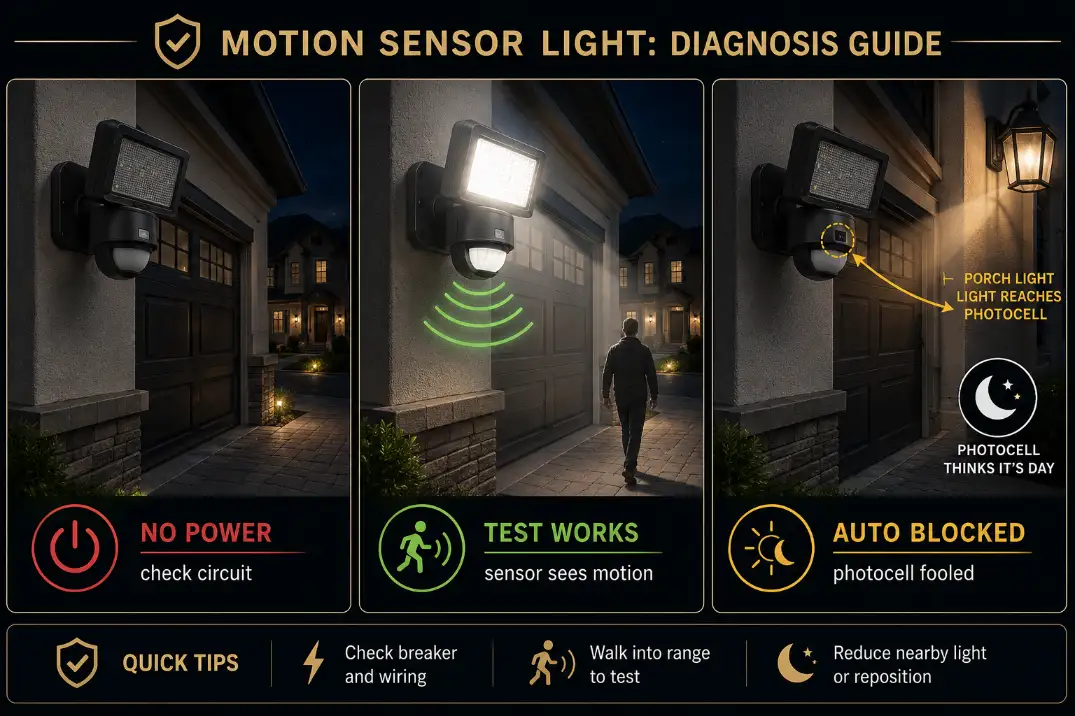
First Identify the Type of Motion Light You Have
Hardwired motion floodlight
A hardwired 120V motion floodlight depends on the house circuit before the sensor matters. Wall switches, breakers, exterior GFCI outlets, timers, and loose splices can all make the motion head look faulty when the fixture is simply not getting reliable power.
If the fixture is completely unresponsive, start with the broader troubleshooting path in Outdoor Motion Sensor Light Not Working before spending time on sensitivity. A motion sensor cannot detect anything if the fixture is not being powered correctly.
Solar motion light
A solar motion light adds a different first question: did the battery charge enough during the day? Many small solar fixtures need about 6–8 hours of direct sun for dependable night operation. Shade from eaves, trees, north-facing walls, dirty panels, and winter sun angles can reduce charging long before the sensor itself fails.
If your solar model is dark every night but briefly works after charging indoors or in full sun, treat it as a charging or battery problem first. For that branch, Best Solutions for Solar Lights Not Turning On at Night is more useful than hardwired floodlight advice.
Smart or camera floodlight
Smart floodlights add app logic on top of normal motion logic. A light can stay off because the app has disabled motion-activated lighting, a schedule is active, motion zones are too narrow, the camera is offline, or a firmware update changed behavior. If the lamp works from the app but not from motion, focus on automation settings before touching the wiring.
The Three Permissions: Power, Darkness, Motion
Power comes before sensor diagnosis
A working motion light needs stable power before every other test means anything. For a hardwired US fixture, that usually means about 120 volts at the fixture box. If you are not comfortable testing voltage safely, stop at the switch, breaker, and GFCI checks and call a qualified electrician.
Do not bypass a GFCI to “prove” the light works. Repeated GFCI trips, burnt insulation, water inside the box, or a breaker that will not stay reset are stop signs, not troubleshooting puzzles.
Darkness permission can be fooled
Most outdoor motion lights use a photocell or electronic dusk sensor so the light will not turn on during the day. That same feature can block the fixture at night if the photocell sees porch light, streetlight, neighbor floodlight, reflected window glare, white siding, or snow-covered pavement.
The mistake is judging darkness by the driveway instead of by the photocell. The area may look dark to you while a small sensor window is still seeing enough light to read “day.” If the fixture is tied to a timer or photocell behavior, the diagnosis overlaps with Outdoor Lights Not Turning On After Timer or Photocell.
Motion must cross the detection zones
PIR motion sensors detect changes in infrared heat. They usually respond better when a person moves across the sensor’s field than when someone walks straight toward it. A light mounted 8–10 feet high near a garage often covers a driveway well. A unit mounted too high under a second-story eave may miss normal walking movement near the door.
This is where symptom and mechanism get confused. The symptom is “the light stayed off.” The mechanism may be that no strong heat change crossed the sensor zones, even though someone was technically nearby.
Reset It, But Reset It for the Right Reason
Manual override can mimic failure
Many motion lights have a manual override mode controlled by the wall switch. A quick off-on toggle may force the light on, disable automatic sensing, or confuse the operating state depending on the model.
After a power outage, breaker reset, or repeated switch flipping, the fixture may not behave the way the dial settings suggest.
Turn the switch or breaker off for 60 seconds, turn it back on, then wait 1–2 minutes for the sensor to stabilize. Avoid rapid toggling unless the manufacturer’s instructions specifically call for it.
TEST mode is the cleanest sensor check
Set the fixture to TEST mode, if available, and walk across the detection area at roughly 10 feet, 20 feet, and 30 feet. Do not stand directly under the light and wave your arms. That only proves the sensor sees close-range motion, not that it covers the driveway, gate, steps, or walkway.
Pro Tip: Set TIME low and SENS mid-range during testing. Maximum sensitivity can mislead you by picking up traffic, pets, HVAC exhaust, or moving branches instead of the area you actually care about.
Photocell Lockout Is More Common Than Sensor Failure
Do the cover test
At night, cover the photocell with opaque tape or your hand for 60–90 seconds, then walk across the sensor zone. Some fixtures react quickly; others include a short delay to avoid cycling from brief shadows or passing headlights.
If the light turns on after the photocell is covered, the fixture is probably not dead. The more likely issue is that ambient light is reaching the dusk sensor. Rotating the sensor head, changing fixture angle, reducing nearby glare, or shading the photocell without blocking the motion lens may solve it.
Don’t confuse delay with failure
A 5-second delay is normal on many fixtures. A 1–2 minute warm-up after restoring power can also be normal. But if the fixture stays off after several cross-path walk tests, with the photocell covered and power confirmed, repeating the same test is not useful. Change one variable at a time: mode, LUX setting, sensitivity, sensor angle, then power confirmation.
New Installation vs. Old Failure
A new motion light that never worked deserves a different diagnosis than a fixture that worked for years and then stopped.
If the fixture is new
Look first at wiring, operating mode, dimmer or timer conflicts, missing neutral, loose wire connectors, and photocell exposure. A new fixture mounted near another exterior light may be locked out from the first night because its dusk sensor is aimed at glare.
Also check whether the wall switch is part of a 3-way circuit, timer, smart switch, or dimmer. Some motion lights do not behave well on dimmers or electronic controls unless the fixture is designed for them.
If the fixture used to work
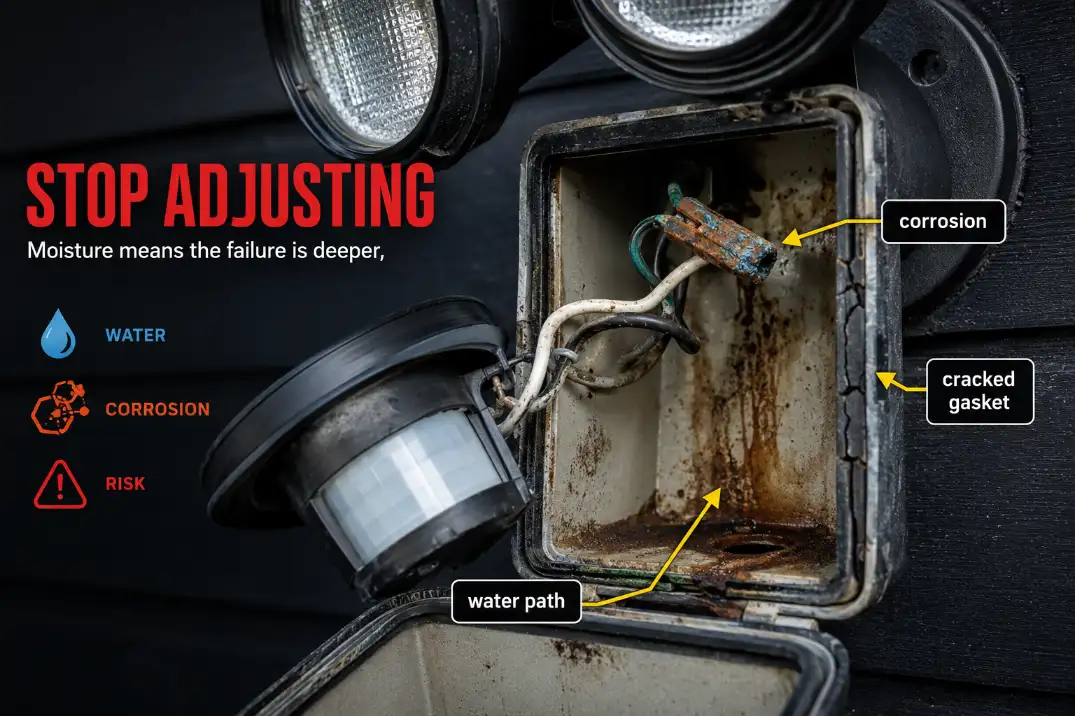
A fixture that worked for years and then stopped is more likely dealing with moisture, corrosion, power interruption, sensor electronics, or LED driver failure. Outdoor housings age. Gaskets flatten. Plastic lenses haze. Wire connectors loosen from heat, cold, vibration, and freeze-thaw cycles.
In humid areas like Florida, coastal parts of California, or rainy Midwest seasons, small amounts of moisture can create intermittent behavior before the light fails completely. When the pattern is weather-related, Moisture Damage in Outdoor Lighting Explained is a better next step than more sensitivity adjustment.
When Rain, Cold, or Ambient Light Changes the Diagnosis
Fails after rain
If the light fails after rain and recovers after 12–48 hours of dry weather, suspect water intrusion, corrosion, or a compromised splice. The sensor may be only the visible part of the problem. Look for water inside the lens, rust trails, cracked caulk, loose mounting screws, and white or green corrosion on terminals.
Fails in winter
Cold can make a warm person easier for a PIR sensor to detect, but winter also exposes brittle gaskets, stiff wiring, condensation, and cracked plastic. In northern states, a fixture that worked in fall but fails after freeze-thaw cycles may have a housing or connection issue, not a weak motion sensor.
Fails near other lights
Nearby light is commonly underestimated. Streetlights, coach lights, landscape uplights, bright garage fixtures, and reflected snow can all hold a photocell in daytime mode. This is especially likely when the light works during covered-photocell testing but refuses to operate normally at night.
When Replacement Makes More Sense Than Another Adjustment
At some point, more aiming and resetting stops being diagnosis. Replacement becomes reasonable when line power is confirmed, TEST or manual mode still fails, the photocell cover test changes nothing, settings are verified, and the fixture shows water damage or corrosion.
For integrated LED motion lights, a failed driver or sensor often means replacing the fixture rather than repairing it. For replaceable-bulb models, bulb compatibility is worth checking only after the fixture shows some sign of life, such as clicking, partial response, or manual operation.
Repair or adjustment still makes sense when manual mode works, TEST mode works, covering the photocell makes the light respond, or the sensor is simply aimed at the wrong area.
If the light works sometimes and fails unpredictably, compare the pattern with Outdoor Lights Working Intermittently before assuming the sensor is dead.
Questions People Usually Ask
Why does my motion light work in TEST mode but not AUTO?
That usually means the lamp and motion sensor can still function, but automatic night operation is being blocked. The most likely causes are the LUX setting, nearby light reaching the photocell, or the fixture being in the wrong operating mode.
Can a wall switch stop a motion sensor light from working?
Yes. Some fixtures use the wall switch for manual override. Quick toggling, power interruptions, or smart-switch behavior can leave the fixture in a mode that does not match what you expect. A clean 60-second power reset is worth trying before replacing parts.
Why won’t my new motion sensor light turn on at night?
For a new fixture, suspect wiring, mode settings, photocell exposure, dimmer or timer incompatibility, or a sensor aimed away from the actual walking path. Weather aging is much less likely on a brand-new installation.
Do solar motion lights need direct sun to work at night?
Usually, yes. Many solar motion lights need several hours of direct sun to charge well enough for reliable night operation. If the panel gets only filtered shade, winter sun, or light through a dirty surface, the light may stay off even though the motion sensor is fine.
Bottom Line
A motion sensor light that won’t turn on at night is not automatically a bad sensor. The best order is power first, operating mode second, photocell third, motion angle fourth, and fixture failure last.
If it fails in TEST or manual mode, stop chasing sensitivity and check power or fixture failure. If it works in TEST but not AUTO, focus on darkness permission, LUX settings, nearby light, and sensor aim.
If it fails after rain or shows corrosion, the repair has moved beyond normal adjustment.
For broader electrical safety guidance around home wiring, breakers, GFCI protection, and lighting checks, see the CPSC Home Electrical Safety Checklist.