
A smart outdoor light turns on correctly at dusk. Motion raises its brightness, but when the motion period ends, the fixture switches off even though the evening schedule should still be active. You restore it manually, and a later scene changes it again.
That sequence looks unreliable, but it can mean the light is executing every command correctly. The failure is not necessarily inside the fixture; it may be in the handoff between rules.
The useful diagnosis is based on control ownership. Identify which rule established the normal state, which event temporarily changed it, and which command was supposed to restore it. Looking only at whether the light is currently on or off hides that sequence. Reconstructing it often reveals why a setting appears to work and then seems to reverse itself.
App Rule Conflict
The first decision is whether the light is ignoring commands or obeying too many of them. A fixture that changes correctly and later returns to another state usually points toward competing command paths rather than one failed instruction.
An automation has three distinct parts: a trigger occurs, the rule issues a command, and the device reaches a resulting state. Sunset might trigger “set porch light to 40%,” producing a 40% evening state. That visible state does not show what other rules remain ready to run.
At 7:45 p.m., a dusk rule may set the light to 40%. At 8:05, a voice routine raises it to 80%. At 8:10, an outdoor scene returns it to 25%. All three commands can succeed while the overall behavior feels unstable.
Find every route to the test light
Choose one light and list every control path capable of reaching it:
- The device manufacturer’s app
- A wider smart-home platform
- Voice-assistant routines
- Dusk or clock schedules
- Motion-sensor automations
- Scenes and device groups
- Personal routines created by other household members
Duplicate schedules are especially easy to miss when the light was automated in its native app and later connected to a broader platform. Disabling the visible schedule in one app does not necessarily disable a similar rule stored elsewhere.
Reconstruct a short event history: note the starting state, the first change, and what happened immediately before the next change. Check an activity history or automation log when the platform provides one. A log can shorten the search, but the same command paths can still be isolated without it.
A successful command is not proof that the conflict has disappeared. It may only mean that the competing rule has not reached its next trigger.
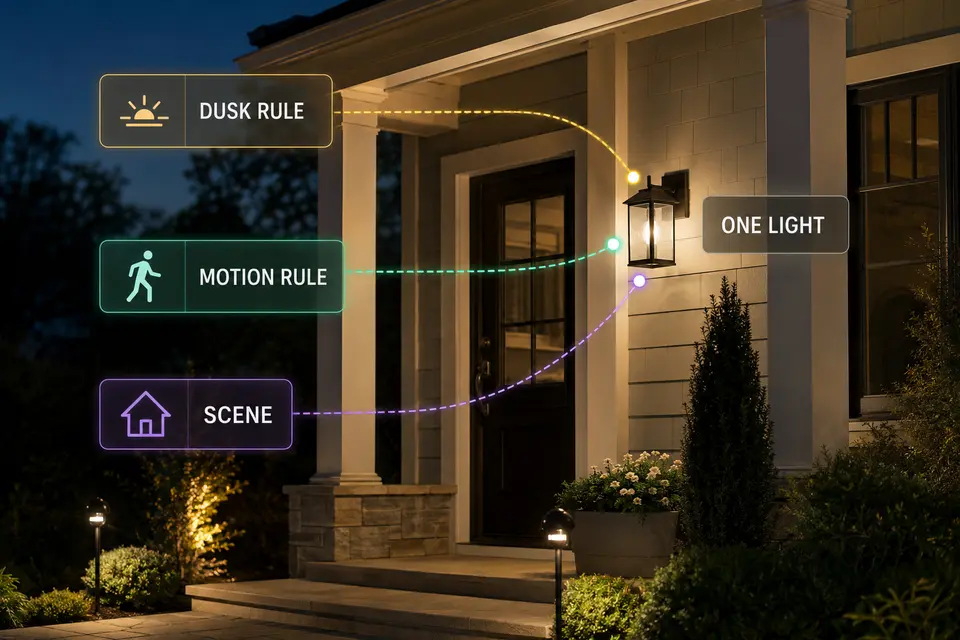
Dusk Rule vs Motion Rule
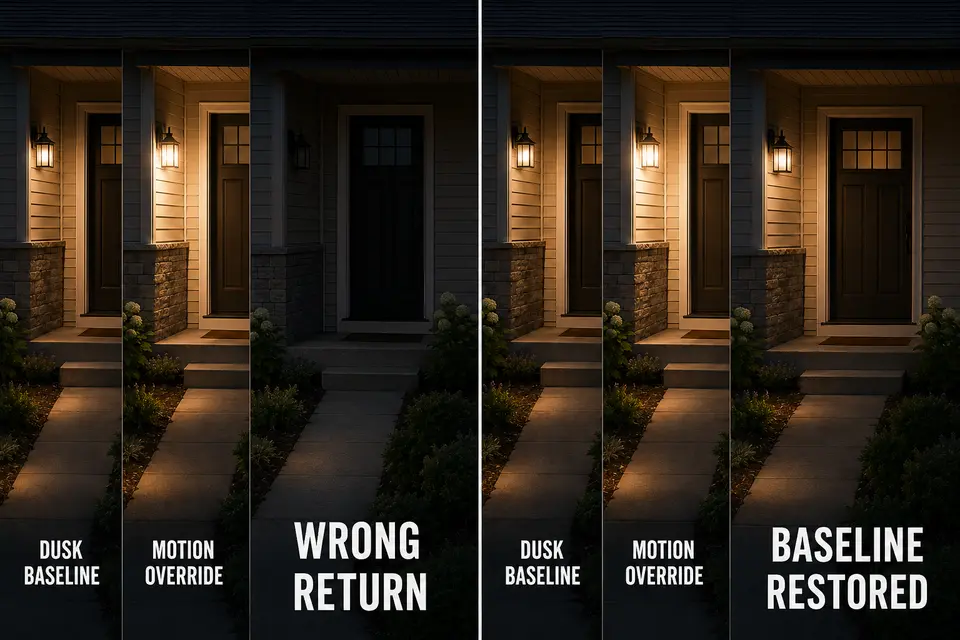
Dusk should either own the evening baseline or stay out of the light’s behavior entirely. Motion can temporarily interrupt that baseline, but the automation needs to say what happens when the interruption ends.
Consider this illustrative sequence:
- At dusk, the light turns on at 35%.
- Motion raises it to 100%.
- Five minutes later, the motion rule commands “off.”
- The dusk rule does not run again because its sunset trigger has passed.
The motion rule has worked as written, but its final command has erased the evening baseline. Unless another event runs, the fixture can remain off for the rest of the scheduled period.
The real conflict is therefore not which trigger fired first. It is the missing return state. Define the normal dusk level, the temporary motion state, and the state restored when motion expires.
If repeated detections keep extending or restarting the event, investigate separate motion-sensor sensitivity problems before rewriting otherwise coherent automation logic. Physical retriggering and contradictory software instructions can produce similar symptoms, but they require different fixes.
Motion may independently own a light that stays off at other times. It may also temporarily modify a dusk-owned light and then restore the earlier level. Both arrangements can work. The unstable arrangement is the one in which the motion rule assumes a baseline exists while its reset command destroys it.
Scene Priority
Do not assume that a scene has permanent priority. Its practical power comes from scope and timing: one activation may overwrite several carefully tuned device states at once.
A “Patio Evening” scene might lower decorative lights, switch off a driveway fixture, and set the porch light to a remembered brightness. The same porch light may also belong to a motion routine and an arrival scene.
Priority behavior varies among platforms and rule configurations. The most recently executed applicable command often explains the visible state, but that relationship must be verified in the actual system rather than treated as universal.
Test scene scope with one light. Put it in a known manual state, activate one scene, and observe whether it changes. Repeat with each relevant scene separately. Activity-based scene names can conceal forgotten device membership, particularly after lights have been moved or assigned new roles.
Keep route and step lighting outside broad decorative scenes when it requires independent behavior. An entertaining scene should not recreate porch lighting that leaves steps difficult to read merely because a safety-relevant fixture was included in a whole-zone dimming command.
The common mistake is adding a corrective scene before identifying the original claimant. That does not resolve ownership; it creates another command path whose timing may hide the conflict for one evening and expose it the next.
Shared Device Confusion
Audit who and what can control the physical light before changing its automation. Shared access becomes confusing when one endpoint is represented through several users, groups, routines, or outdated device entries.
Another household member may operate the light manually, include it in a personal bedtime routine, or use a voice command that is absent from the primary administrator’s automation list.
Group membership can obscure control in the same way. A routine targeting “Front Yard” may change the porch light even when that fixture is not named in the visible rule summary.
Renamed, relocated, or re-added devices deserve careful verification. An old entry can remain inside a stale routine, while two similar names may represent different physical devices. Do not delete every duplicate-looking item until each identity has been confirmed.
Use names based on both location and role, such as “Front Steps Guide Light.” Apply the same clarity to routines and scenes, then audit group membership and household automations before treating the fixture as unreliable.
Manual Override
A manual override needs an expiration rule. Without one, it is merely a command that changes the current state while every future automation remains enabled.
Turning a light off manually at 9:00 p.m. may work exactly as intended. Motion at 9:02 can then legitimately turn it on again. The apparent failure comes from expecting the manual action to suspend logic that was never paused.
Decide whether manual control should last until the next event, remain active for a defined period, or persist until a scheduled reset. If the platform provides a specific method for pausing or disabling automations, distinguish that action from changing the device state alone.
Physical wall-switch behavior varies with the fixture, switch, and control system. Do not assume that cutting or restoring power produces the same override in every installation, and do not bypass required controls or perform electrical work as part of this test.
If the light continues changing after every relevant automation has been disabled, the evidence has crossed the software boundary. Investigate the connection, sensor, fixture, or inconsistent outdoor-lighting power instead of building another corrective rule.
Rule Cleanup Test
The strongest cleanup starts with isolation, not deletion. Use one noncritical outdoor light so the test cannot remove essential step or entry visibility, and record or screenshot its existing rules before changing anything.
Isolate and rebuild the control path
- Temporarily disable every automation, scene, group routine, and household rule capable of targeting the test light.
- Operate the light manually and confirm that it holds the commanded state.
- Restore only the rule responsible for the normal evening baseline.
- Add the motion exception and wait through its complete trigger-and-reset period.
- Reactivate scenes and household routines individually, repeating the observation after each addition.
- Run one complete dusk-to-motion-to-manual cycle under normal evening conditions.
As each layer returns, name the intended owner of every state: evening baseline, motion exception, scene exception, manual change, and return state. A temporary event without a deliberate ending or restoration path leaves control ownership unresolved.
Wait through the full reset period after every reactivated rule. A quick on-off test may confirm the trigger while completely missing the delayed command that causes the conflict.
Remove duplicate or stale rules only after the behavior has been reproduced and the responsible command path identified. This preserves a recovery route and prevents the wrong rule from being deleted simply because its name looked suspicious.
Cleanup check
- One noncritical test light has been isolated.
- Every app, scene, group, and household routine targeting it is known.
- One rule owns the normal evening state.
- Every temporary event has a defined ending or return state.
- Manual control has a known duration.
- The light remains stable through one complete evening cycle.
If an isolated motion automation still fails while competing rules remain disabled, treat it as a motion sensor that still does not respond correctly rather than an automation conflict.
Reliable automation does not mean one rule must control everything. It means the normal state has a clear owner, temporary exceptions have limited authority, and every exception has an intentional route back. If the light remains unstable after those command paths are disabled, further rule editing is no longer the useful test.
For a technical overview of how events initiate automations, see the Open Home Foundation’s documentation on automation triggers.