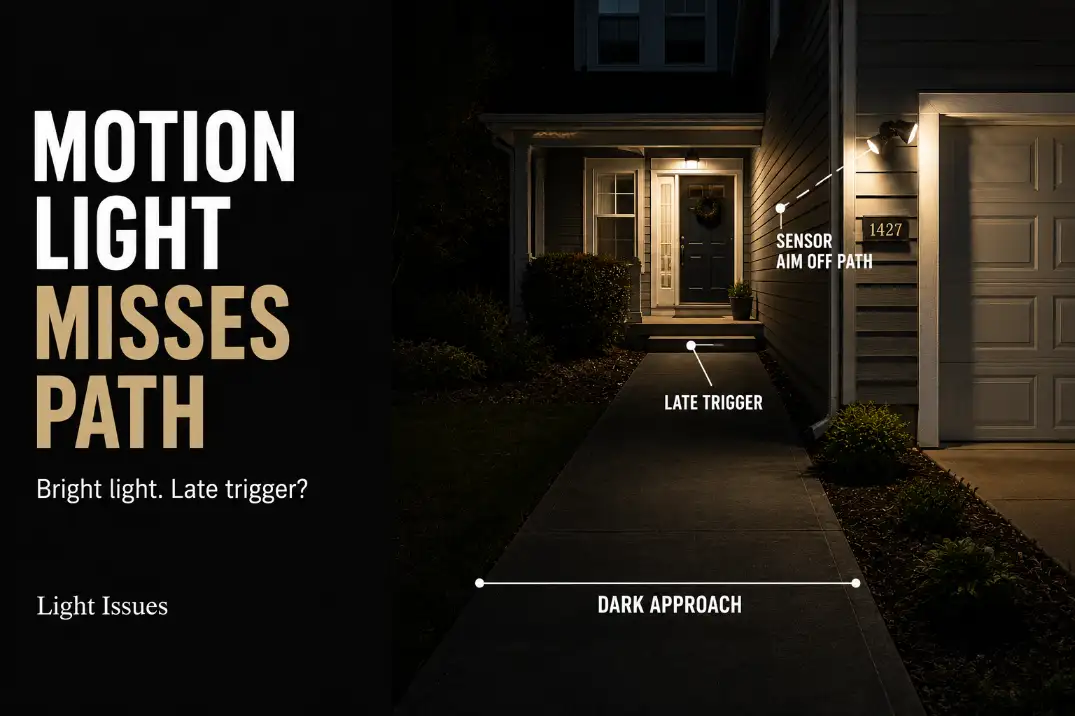
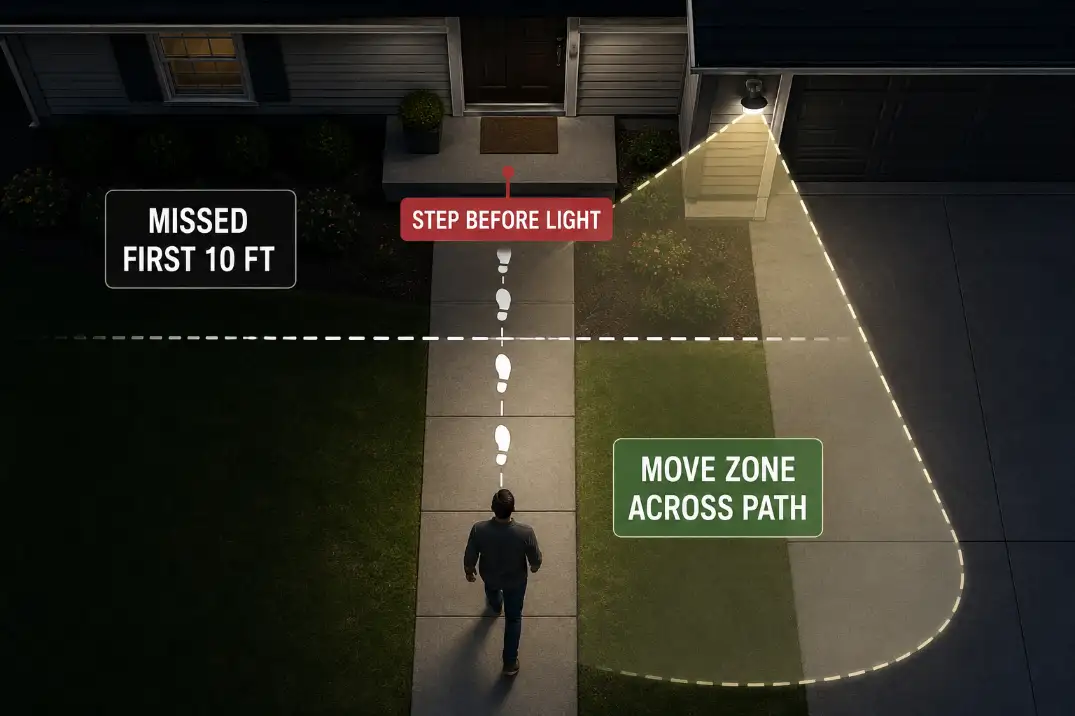
A motion light that misses the walk path is usually not failing completely. The more common problem is that the sensor zone is aimed at the wrong movement, so the light reacts to cars, shrubs, or the porch area while the first 6–12 feet of the walkway stay dark.
If the light turns on every time but only after you reach the last third of the path, treat it as a coverage problem. If it will not turn on in test mode at all, treat it as a sensor, control, or power problem.
The first useful checks are simple: where the sensor points, when the light triggers during a normal approach, and whether your body crosses the detection zone from the side or walks straight toward it.
Problem timing starts when the light does not trigger until you are within about 3–5 feet of the step, gate, lock, or door landing.
A healthier setup usually gives you light at least 6–8 feet before the hazard, and often 8–12 feet before the door on a short front walk.
Wrong Sensor Angle
Why straight-in approach gets missed
Most motion lights are better at detecting movement across the sensor than movement directly toward it. That matters on walk paths.
A person walking straight toward a porch or garage-mounted sensor may create less visible change across the sensor’s field than a car crossing the driveway or a branch moving sideways near the street.
That is why a light can feel “strong” and still fail the approach. The fixture may throw plenty of light after it activates, but the sensor does not see the right motion soon enough.
The symptom is darkness on the first part of the route; the mechanism is a detection zone that does not cross the walking line early.
Homeowners often overestimate brightness and underestimate detection geometry. A 2,000-lumen floodlight can still miss the walk if the sensor zone starts too close to the door.
A softer light with a better motion zone can feel safer because it turns on 2–4 seconds earlier.
If the fixture also lights the wrong surface after it turns on, the issue may be both sensor aim and beam aim.
That is a different failure pattern than late triggering alone, and it is worth comparing with Outdoor Lights Miss the Target Area before replacing the fixture.
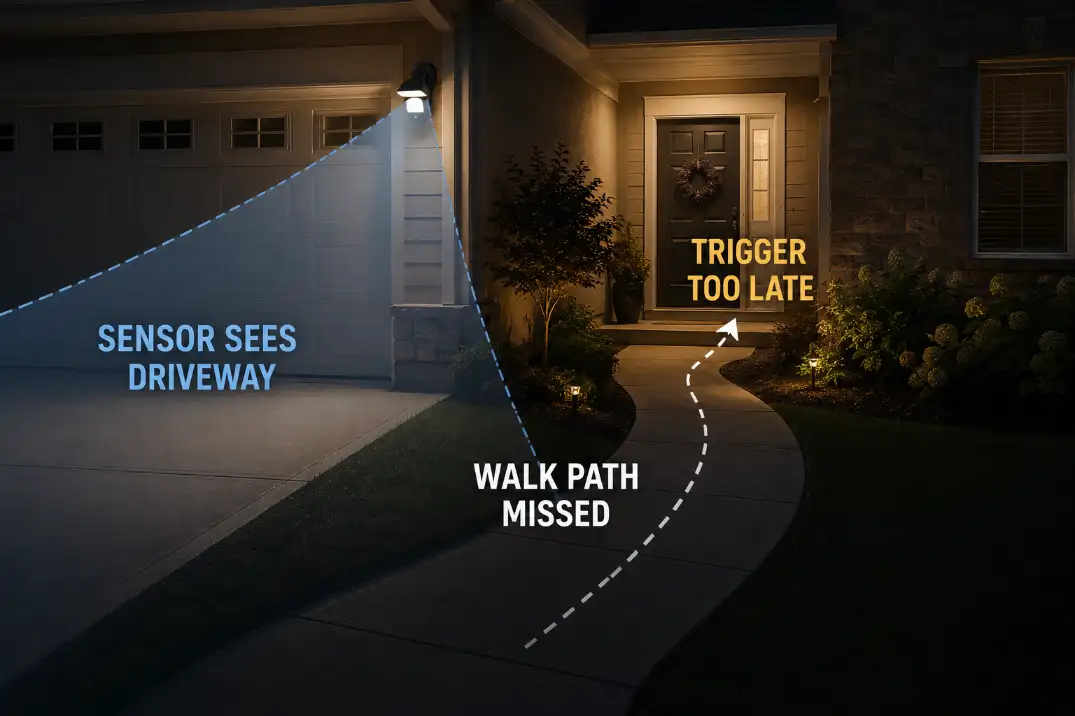
Aim the sensor, not only the lamp heads
A common wasted fix is adjusting only the lamp heads. That may brighten the door, steps, shrubs, or siding after the light activates, but it does not help if the sensor still sees the path too late. Treat the sensor lens as a separate aiming job.
For many residential fixtures, a better aim catches the walkway at a slight cross-angle. The goal is not to point the sensor as far as possible.
The goal is to make the walking route cross the detection area before the person reaches the step, gate, lock, or landing.
Aim Check: Test the light by walking the route normally. Waving a hand under the fixture proves the sensor can respond; it does not prove the walk path is covered.
Late Trigger
Mark the first trigger point
Late trigger is the clearest clue that the light works but the motion zone is wrong. The useful trigger point is not the front door itself. It is the spot where the person still has enough distance to see the next step, wet patch, curb, latch, or uneven paver.
Use a simple walk test:
- Start from the sidewalk, driveway edge, or normal entry point.
- Walk at normal speed without waving your arms.
- Mark where the light first turns on.
- Measure from that trigger point to the step, gate, or door landing.
- Adjust the sensor by a small angle, wait 30–60 seconds for reset, and repeat.
If the light first turns on only 3–5 feet before the door, it is late for most walk-path safety use. If it catches you 8–12 feet before the landing on a short approach, the timing is usually more useful. On a longer side path, a 15–20 foot trigger point may make more sense, especially if the route includes a turn or gate.
Test mode can hide the real problem
Test mode is useful, but it can make a weak setup look better than it is. Some fixtures shorten the shutoff delay, ignore dusk settings, or respond more aggressively during setup.
That helps you locate the rough detection edge, but it does not prove the normal nighttime mode is tuned correctly.
After rough aiming, test again after dark in the fixture’s normal mode. If the light behaves during setup but misses the path later, the issue may involve dusk settings, sensor mode, or control logic.
In that case, Outdoor Security Light Test Mode Not Night is the better diagnostic path than replacing the lamp heads.
Short Approach
Small yards give the sensor less warning distance
Short approaches are less forgiving than long driveways. If the walkway from the driveway or sidewalk to the door is only 10–18 feet, the motion zone has very little distance to catch movement before the person reaches the landing.
A sensor mounted high above a garage or porch may not see the person until they are already close.
That is why turning up sensitivity is not always the best first move. More sensitivity may catch cars, trees, or sidewalk movement without improving the first few feet of the walkway.
The better fix is often lowering the detection zone, angling it across the approach, or adding a lower support light near the actual dark section.
A short approach also changes how you judge delay. A 3-second delay may feel minor in a driveway. On a 12-foot walk, it can mean the light turns on after the person has already crossed most of the route.
High mounting can create a near-wall miss
High-mounted motion lights can cover a wide area, but they may leave a weak detection area close to the wall or directly below the fixture.
A fixture mounted around 8–10 feet high is usually easier to tune for a front walk than one placed high on a two-story wall or gable.
That does not mean high fixtures are always wrong. It means they need a real path test. If the first safe trigger point sits below the sensor’s effective angle, brighter bulbs will not fix the timing.
For very short approaches under about 12–15 feet, a second lower fixture or a small path-light layer may outperform more sensitivity.
Blind Spots
A dim patch is not the same as a missed trigger zone
A blind spot is not just an area that looks dim. It is an area where motion is not detected at the right time. That distinction matters because many people respond by adding more brightness.
The final lit area becomes harsher, but the first part of the path still stays dark until the person reaches the wrong spot.
The dark gap is the clue. If the light turns on only after the person passes the first step or narrow turn, the detection zone is late.
If the light turns on early but the surface still looks uneven, the issue is beam placement, path-light spacing, or glare.
| What you notice | More likely cause | Better first move |
|---|---|---|
| Light turns on near the door only | Sensor zone starts too late | Re-aim sensor across the approach |
| Light turns on for cars but not walkers | Zone favors driveway or street | Rotate or narrow the detection area |
| Light catches people leaving but not arriving | Direction crosses the sensor differently | Test both directions before adjusting |
| Light is bright after it turns on | Output is not the main issue | Fix trigger point before brightness |
| Light never responds in test mode | Sensor, setting, or power issue possible | Check mode, power, and controls first |
A blind spot becomes more serious when it overlaps a step, sloped walkway, wet concrete, or side gate. In northern states, that missed zone can feel worse during icy months because foot placement matters more. In humid or rainy regions, a dark landing can hide wet leaves, algae, or puddled low spots.
If the walkway is lit but still feels unsafe because the spacing creates alternating bright and dark patches, the problem may belong more to path lighting than motion detection.
In that case, Pathway Lights and Walkway Safety is the more relevant comparison.
Street Triggers
Do not lower sensitivity before fixing aim
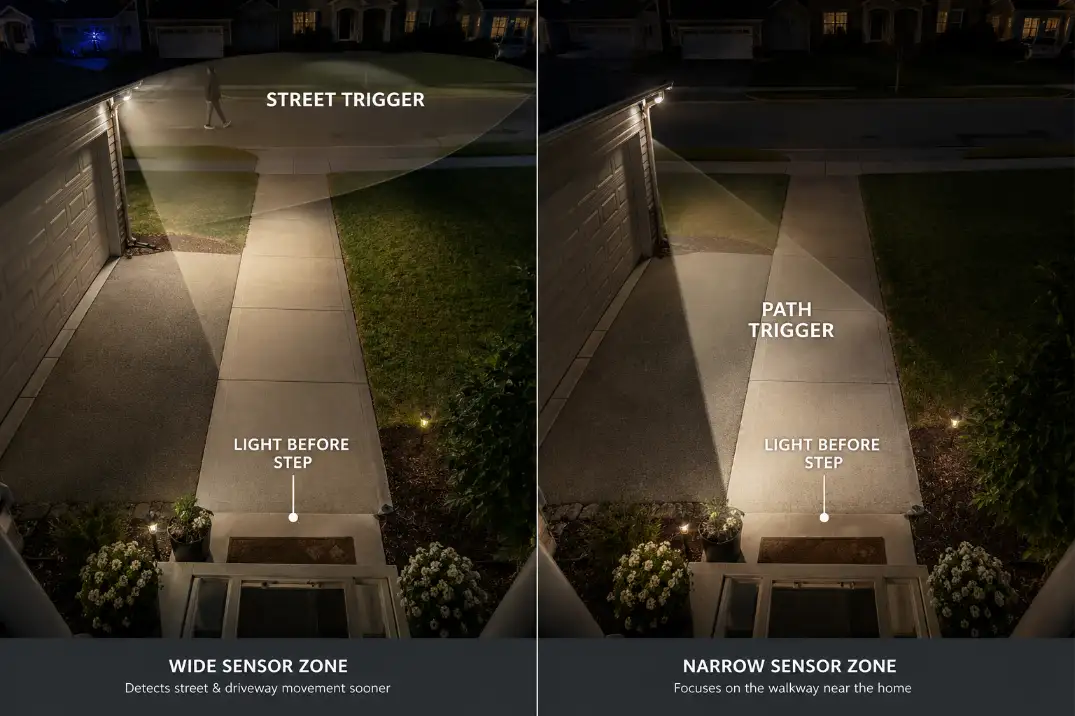
Street triggers happen when the sensor sees cars, sidewalks, neighbors, moving branches, or reflective movement beyond the intended zone.
The usual reaction is to turn sensitivity way down. That may stop nuisance triggers, but it can also make the walk path even less reliable.
Use this order instead: aim first, narrow or mask second, sensitivity third.
If the light detects the street but misses the walk path, sensitivity is not the main problem. The sensor is spending its range on the wrong movement.
If the light catches the walk path correctly but also sees passing cars, then range, masking, or sensitivity becomes the next adjustment.
A controlled 12–25 foot detection zone is often more useful than maximum range for a front walk. The light does not need to detect every movement 50–70 feet away. It needs to detect a person before the first step, gate, latch, or landing.
When nuisance triggers create a safety problem
Street triggers are not just annoying. They can make the light less trusted. If it turns on every few minutes for traffic, wind, or sidewalk movement, homeowners often reduce sensitivity too far or disable motion mode entirely. That solves the nuisance and brings back the dark approach.
The better correction is more precise: tilt the sensor slightly down, rotate it away from the street, use any included side shields or detection masks, and then reduce sensitivity only enough to stop the extra triggers.
If every adjustment still catches the street before the path, the fixture location may be wrong.
When the main complaint is nuisance activation rather than missed detection, compare the setup with Outdoor Motion Sensor Light Too Sensitive before assuming the fixture is defective.
Better Motion Zone
Build the zone around the first useful moment
A better motion zone starts where the person needs light, not where the fixture happens to notice movement. For a walk path, the first useful moment is usually before a step, turn, gate, latch, narrow side yard, or door landing.
Mark that hazard point first. Then adjust the sensor so normal walking motion crosses the detection zone before reaching it.
The strongest setup separates three jobs.
Sensor zone
Aim the sensor so a person walking the normal route crosses detection 6–12 feet before the main hazard. Test from both directions if people use the path for entry and exit. If arriving fails but leaving works, the direction of movement is still wrong.
Light beam
Aim the lamp heads at the walking surface, lock area, or landing. Do not aim them into eye level. Bright light pointed too high can make the house look secure while making the actual footing harder to read.
Range and sensitivity
Use range after the angle is close. If the light detects the street before the walk path, range is not the first problem. If it detects the walk path but also catches traffic, reduce range or sensitivity in small steps.
For broader aiming logic, Aim Outdoor Security Lights is the better next read because it separates useful coverage from glare, overshoot, and wasted brightness.
Smart zones still need physical aim
Smart motion lights and camera floodlights can add app-based detection zones, alerts, and schedules, but they do not erase bad physical placement.
If the sensor or camera sees the driveway more clearly than the walkway, the app zone may reduce alerts without fixing late light activation.
Start with the same physical rule: the walk path should cross the detection area before the hazard. Then use the app to trim cars, sidewalks, or neighbor-side movement. Software zones are fine-tuning.
They are not a cure for a fixture that cannot see the approach early enough.
When Adjustment Stops Making Sense
Replace or relocate after the path test fails
Replacement makes sense when the sensor cannot be aimed toward the walk path, the fixture has no usable range control, the detection lens is damaged, or the light fails normal test-mode checks.
Relocation makes sense when the fixture position will never see the approach before the person reaches the step or landing.
Do not replace a working motion light just because it turns on late once. Replace or relocate it when repeated tests show the same failure after angle, range, mode, and sensitivity have been corrected.
A practical boundary is this: if the light cannot trigger at least 6–8 feet before the first step, gate, or landing without constantly triggering from the street, the fixture location or sensor design is wrong for that path.
At that point, a separate lower motion fixture, a better-positioned wall light, or a path-light layer may outperform a brighter floodlight.
If the sensor sometimes works and sometimes misses, especially after rain, wind, or temperature swings, inspect the control behavior before buying a stronger light.
Intermittent response belongs closer to Outdoor Motion Sensor Light Not Working than to simple aim correction.
Questions People Usually Ask
Should I increase motion light sensitivity first?
Usually no. Aim the sensor first. Higher sensitivity can make the light react to cars, branches, or sidewalk movement while still missing the actual walk path. Sensitivity is a fine-tuning control, not the main fix for a bad detection angle.
Why does my motion light catch me leaving but not arriving?
The approach direction probably crosses the sensor differently. Leaving the house may create more side-to-side movement across the detection zone, while arriving may move straight toward the sensor. Test both directions before deciding the sensor is defective.
Is a brighter motion light safer for a missed path?
Not if the trigger point is wrong. Brightness helps only after the light turns on. If the first 8–10 feet stay dark, better sensor placement matters more than more lumens.
Should the sensor point directly down the walkway?
Not always. A slight cross-angle often works better because motion sensors tend to detect movement across their field more reliably than movement straight toward the lens.
The stronger fix is not a brighter floodlight. It is a motion zone that catches the walk path before the hazard, ignores the street, and lights the surface people actually step on.
For broader official guidance on lighting controls, see the U.S. Department of Energy.