
Outdoor lights are often grouped by proximity: every fixture at the front of the house becomes one group, while everything behind the house becomes another. That looks tidy in an app, but it rarely reflects how the property works after dark.
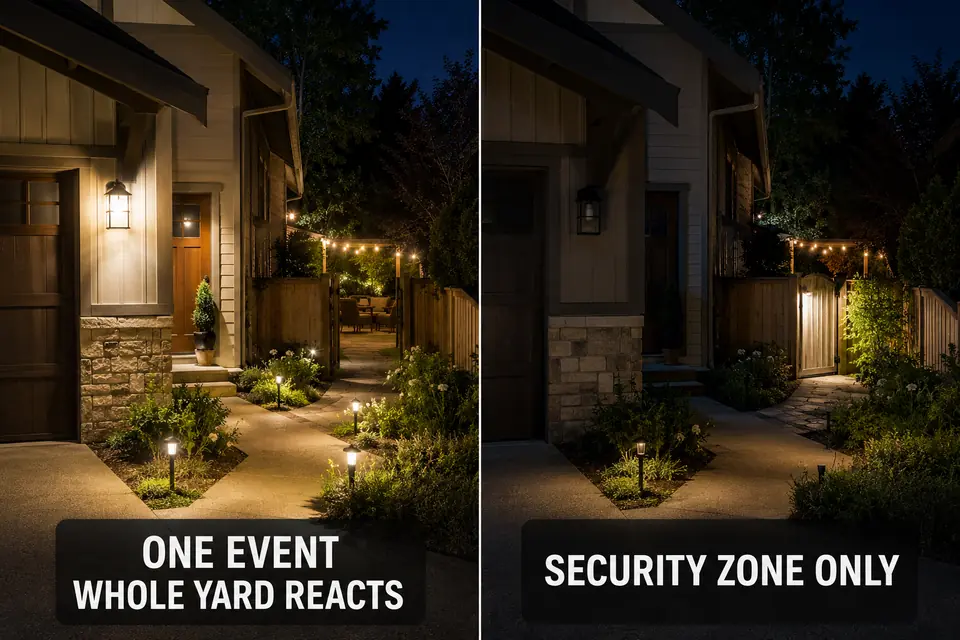
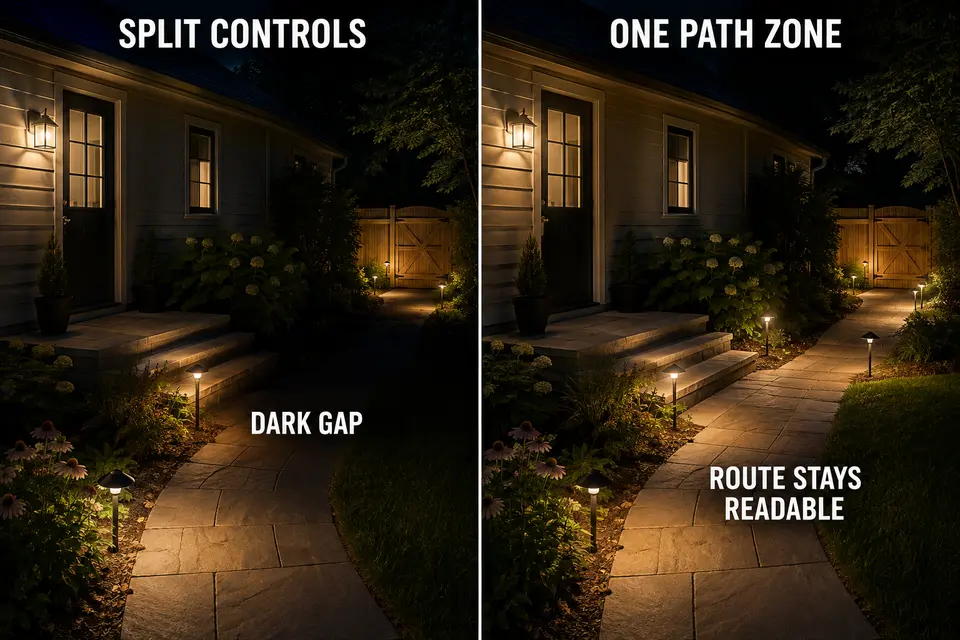
A door landing may need a low, steady baseline. A side gate may need a temporary security response. The patio should follow actual use, while a necessary walking route must remain readable even when the patio is inactive. If those different jobs share one control, a single motion event can brighten half the property—or a timer can shut off the route someone still needs.
A useful lighting zone is therefore not simply a collection of nearby fixtures. It is a control territory with three defined states:
- What the lights normally do
- What event or schedule may change them
- What they return to afterward
Map those states before building schedules or motion rules. The control settings become much easier once each part of the yard has a clear owner.
Entry Zone
The entry zone should be compact. It normally includes the front door, lock area, landing, nearby steps, and the last short section of the approach. It does not automatically include the whole front yard, driveway, garage wall, or every fixture visible from the street.
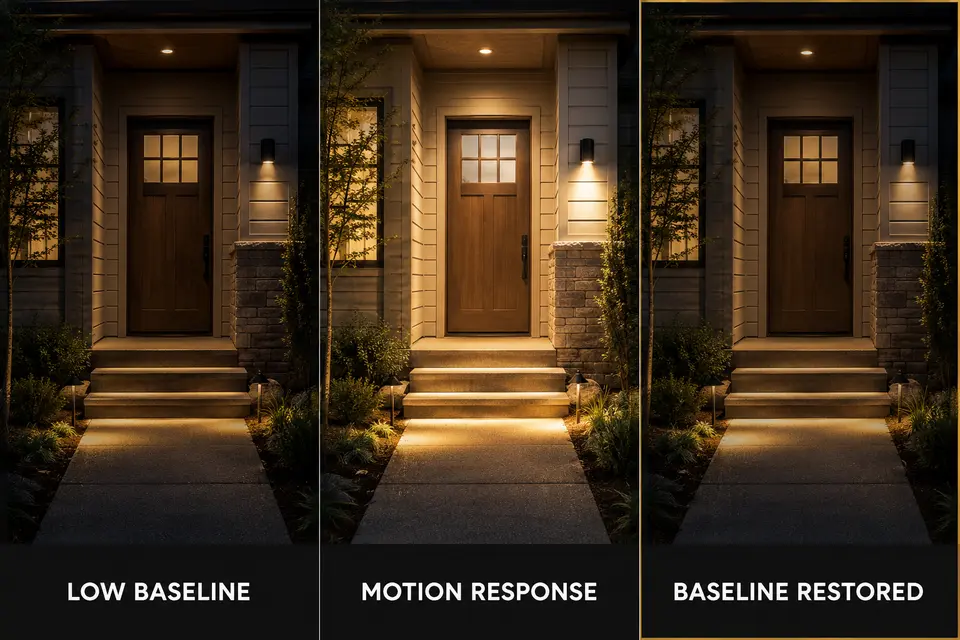
Its first job is to maintain a quiet arrival baseline. The door, landing edge, and step transition should remain readable without making the entry look fully active all night. Motion can temporarily raise that level when someone approaches, but it should not create the only usable light.
Define the return before the response
The important setting is not merely what happens when motion begins. It is what happens after motion expires. The entry should return to its original low baseline rather than remain bright or fall into complete darkness.
That separation matters when several smart rules target the same fixtures. A dusk schedule may establish the baseline while a motion rule temporarily overrides it. If their ownership is unclear, the type of behavior covered in conflicting smart outdoor lighting automations can appear even when every individual rule seems reasonable.
The entry sensor should also respond to entry activity, not every car passing the driveway or movement along a distant property edge. A trigger that observes too much space effectively erases the zone boundary.
Security Zone
A security zone is an event territory, not permission to flood the entire property whenever motion occurs. It may cover a side gate, garage approach, back access point, or another limited edge where unexpected movement deserves a temporary response.
The sensor’s detection area and the lighted area should be considered separately. A sensor may need to observe an approach before a person reaches the gate, but the resulting light can still remain directed toward the relevant access point. Detection does not require every nearby patio, path, and entry fixture to join the event.
Isolate recurring false activity
Traffic, moving branches, pets, or activity on a neighboring property can turn a broad security group into a repeated nuisance. Narrowing the controlled territory is often more useful than simply shortening the on-time. A brief event that activates six unnecessary fixtures is still a poorly assigned event.
This is especially important beside a driveway. If ordinary street activity repeatedly reaches the sensor, the focused adjustments discussed for driveway motion lights that trigger too often belong inside that security territory—not in the entry or patio groups.
The zone also needs a defined post-event state. In many locations that will be off. Where the security area overlaps a necessary route, it may instead return to a restrained route baseline. That overlap should be deliberate, not an accidental result of shared device grouping.
Patio Zone
The patio is an occupancy zone. Its lighting should follow actual outdoor activity rather than every motion event occurring nearby.
A timer can establish the period when patio use is likely, but it should not imply that full activity lighting must remain on throughout that window. Manual scene control or restrained scheduling can start the usable state, while a cutoff time prevents dining, seating, and decorative lights from remaining active after the space has emptied.
The critical boundary is usually between the patio and the route leading away from it. Shutting down the patio should not erase a step, gate, or walkway that someone still needs. Conversely, a person crossing the nearby path should not reactivate the dining and lounge areas.
This separation also prevents a security sensor at the yard edge from repeatedly restoring an old patio state. When saved scenes leave several areas in mismatched conditions, the deeper issue may resemble smart patio lights that feel random, but this article’s zoning decision comes first: the patio group should own activity lighting and nothing beyond it.
Path Zone
A path zone is defined by a complete movement line between two useful destinations. It may connect the driveway to the entry, the patio to a back door, or a side gate to a service area. The route should not be divided simply because its fixtures happen to sit near different parts of the house.
Map the path from destination to destination. Include steps, turns, gates, changes in grade, and transitions between paving and lawn. Those are the points where a fragmented control system is most noticeable.
Keep one necessary route continuous
A path with three independently triggered segments may look efficient on a plan, yet behave badly in use. The next segment may remain dark until a person has already reached the transition. Another segment may time out behind them while they are unlocking a gate or helping a guest over a step.
The path does not need to be uniformly bright. It needs visual continuity. A restrained scheduled baseline can keep the full route legible, while motion provides a temporary increase only where that response genuinely helps.
Fixture placement problems are a separate layer. If the controls activate correctly but the light still misses steps or leaves gaps, route readers to focused guidance such as path lights and walkway safety rather than expanding the zone map into a spacing tutorial.
Quiet Zone
A quiet zone defines where activity lighting stops. It may include bedroom-facing walls, shared property boundaries, inactive lawn, decorative planting areas, or parts of the yard that do not serve a necessary route late at night.
Quiet does not always mean completely dark. An inactive decorative area may turn off, while a short route beside it retains a low baseline. The useful boundary is between lighting that supports necessary movement and lighting that merely makes the property appear active.
The quiet zone should be protected from unrelated commands. A patio scene should not keep bedroom-facing lights active. A security event near one gate should not brighten the full fence line. A path trigger should not restore decorative yard lights after their cutoff.
This is where the return state matters most. Once the patio closes or a motion event expires, each affected fixture should return to its assigned quiet-hours state. A broader framework for preserving essential visibility without maintaining outdoor activity appears in outdoor lighting quiet hours that don’t leave the yard dark.
Simple Map
A useful map does not need electrical symbols or a scaled landscape drawing. Sketch the house outline, doors, patio, walkways, steps, gates, bedroom windows, and property-facing edges. Then draw control boundaries according to nighttime jobs rather than fixture proximity.
For each zone, write three short notes:
- Mark its normal state: off, low baseline, or scheduled activity level.
- Identify the timer, occupancy period, or motion event allowed to change it.
- Record the temporary response.
- Define the state that returns after the event or schedule ends.
One fixture may sit near a boundary, but it should still have one clear control owner. If two zones genuinely need it, define which state has priority and what happens afterward instead of quietly duplicating it across several rules.
Use this final map check before configuring the controls:
- Does every zone have one primary nighttime job?
- Does each necessary route remain continuous?
- Can one motion event activate only the area that needs it?
- Do patio and decorative zones stop without removing essential entry or path visibility?
- Does every temporary response have a defined return state?
The result should not be five perfectly isolated islands. It should be a property where entry, movement, activity, security, and quiet-hour needs can overlap physically without sharing every command.
For broader guidance on using light only where and when it is needed, see DarkSky International’s Five Principles for Responsible Outdoor Lighting.